Viewing key pairs
Use the Key Pairs tab of the Certificates and Key Pairs page to view key pairs for your environment.
Steps
-
In the PingOne admin console, go to Settings > Certificates and Key Pairs.
-
On the Key Pairs tab, browse or search for the key pair you want to view.
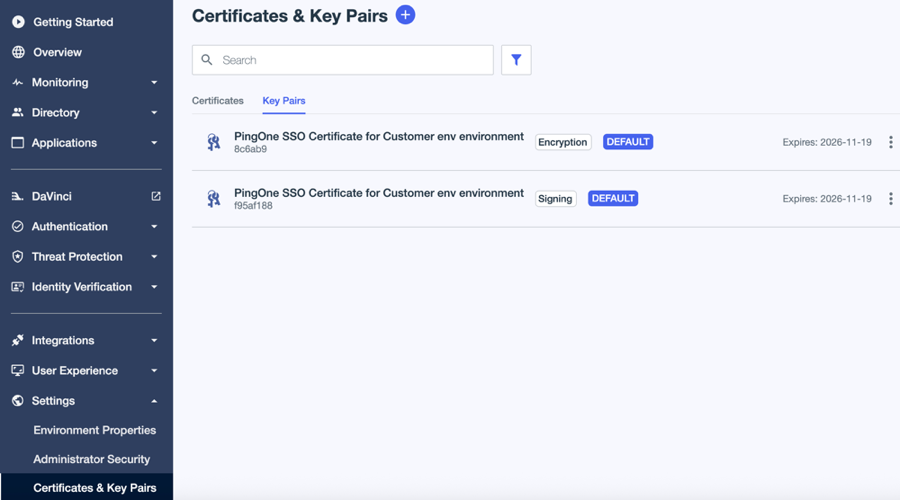
-
Click the key pair to open the details panel.
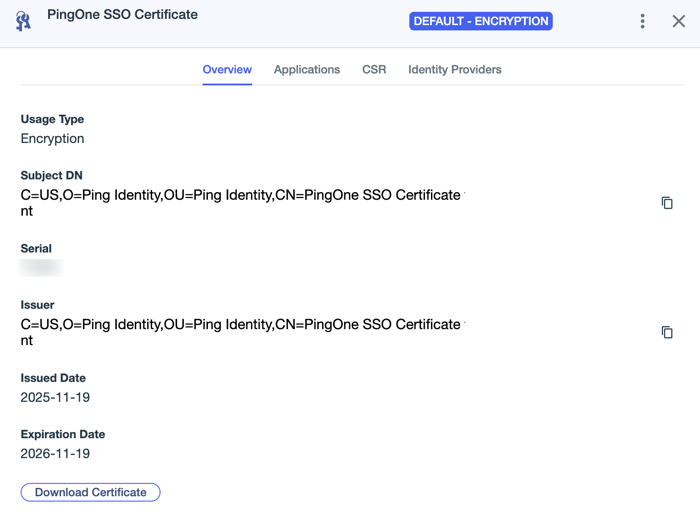
The key pair overview page shows the following information on the Overview, Applications, CSR, and Identity Providers tabs.
- Overview
-
Field Description Usage Type
The primary usage for the certificate, such as signing and verification, encryption, SSL, or issuance.
Subject DN
The subject distinguished name (DN) of the certificate. It includes attribute-value pairs such as common name (CN), organizational unit (OU), organization (O), and country (C).
Serial
Unique serial number generated by the certificate authority.
Issuer
The certificate authority that issued the certificate. The issuer value includes attribute-value pairs such as CN, OU, O, and C.
Issued Date
The date on which the certificate was issued.
Expiration Date
The date on which the certificate will expire.
Download Certificate
Click to download the public certificate in either X.509 PEM (.crt) or PKCS7 DER (.p7b) format.
- Applications
-
Lists applications that are currently using the key pair.
- CSR
-
Use the CSR tab to generate certificate signing requests (CSRs) and import the certificate authority (CA) response. Learn more in Generating a CSR.
- Identity Providers
-
Lists identity providers that are currently using the certificate.