Kerberos authentication
If you are using Microsoft Active Directory as your Lightweight Directory Access Protocol (LDAP) user store, PingOne authenticates users against the Active Directory user store using Kerberos authentication.
|
Because Microsoft Active Directory is the only directory that supports Kerberos for authentication, when you add the gateway connection, select Microsoft Active Directory for Directory type. Learn more in Adding an LDAP gateway. |
Prerequisites
If you are using Kerberos for authentication with Active Directory, ensure that you have:
-
A new or existing service account with a User Principal Name.
-
A higher encryption enabled on the service account. This must be configured with AES 128 bit or 256 bit encryption.
To configure encryption in Kerberos:
-
Start Active Directory Users and Computers.
-
View the properties of the service account for the gateway.
-
Click the Account tab.
-
In the Account Options section, select one or both of the following:
-
Kerberos AES 128 bit encryption
-
Kerberos AES 256 bit encryption
-
-
Known limitations
When an Active Directory user is a member of a large number of groups, they might receive a 413 Request Entity Too Large response during Kerberos authentication. As a user is added to more groups, the size of the Kerberos ticket increases and can exceed the limitations of the PingOne infrastructure.
To resolve this:
-
Remove the user from extraneous groups.
-
Fallback to sign on with username and password when Kerberos fails.
End user authentication flow
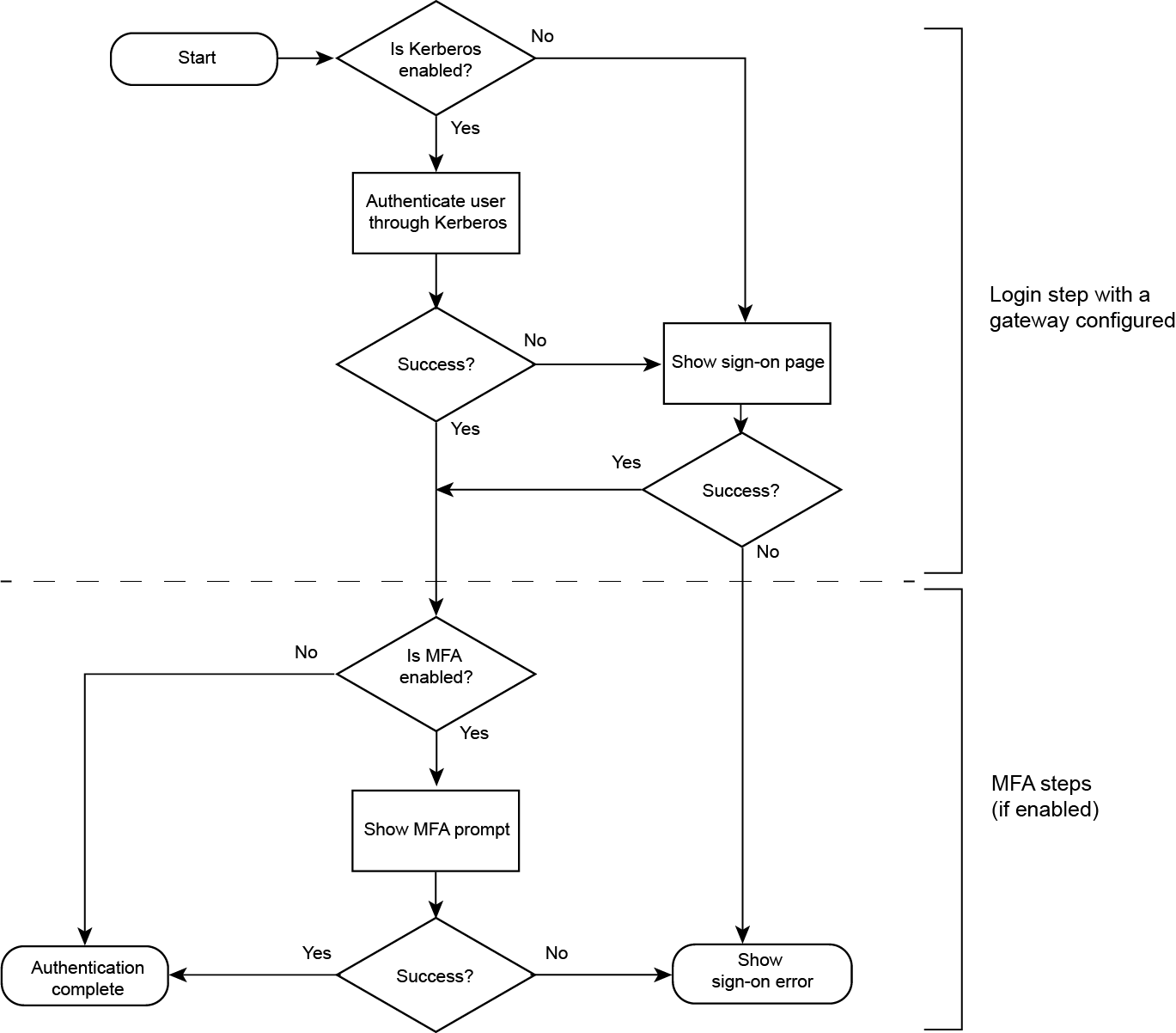
With Kerberos authentication properly configured, the end user authentication flow behaves as follows:
|
To authenticate users through Kerberos using DaVinci, learn more in PingOne Connector in the PingOne DaVinci Connectors documentation. |
-
PingOne authenticates the end-user through Kerberos.
This is a seamless experience and requires no user interaction.
Result:
-
If Kerberos authentication succeeds, the sign on step is complete.
-
If Kerberos authentication fails, PingOne authenticates the end user by showing the sign-on page with user name and password fields.
After the end user provides the correct credentials, the sign on step is complete.
-
-
If the authentication policy has an multi-factor authentication (MFA) step, the following can occur:
-
The end user completes all the MFA steps successfully and PingOne redirects them to the target application browser.
-
The end user fails to provide the correct credentials and PingOne returns a sign-on error to the browser.
-
The following illustration shows the authentication flow.