Overview of the SSO flow
With the Twitter Login Integration Kit, PingFederate includes the Twitter authentication API in the sign-on flow.
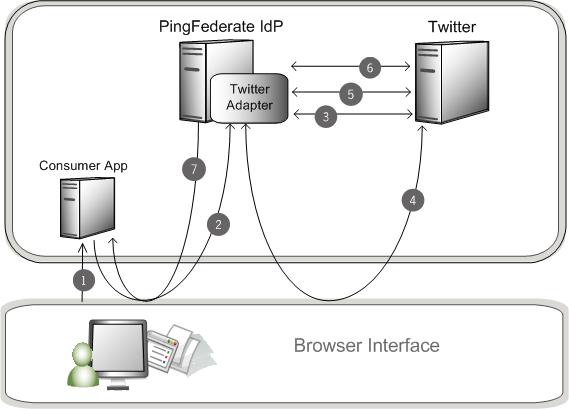
The following diagram illustrates a SP-initiated SSO scenario where PingFederate authenticates users to an SP application using the Twitter IdP Adapter.
Description
-
The user opens a web application and chooses the Twitter sign-on option.
-
The sign-on link points to the Twitter IdP Adapter.
-
The Twitter IdP Adapter requests a request token from Twitter and provides the callback URL. Twitter returns the request token.
-
The PingFederate server redirects the user to Twitter with the request token and a list of requested permissions. On Twitter, the user authenticates their identity, then authorizes the requested permissions.
Twitter redirects the browser to the Twitter IdP Adapter callback URL with a verification code.
If the user fails to authenticate or doesn’t authorize the request, the response includes an error code instead.
-
PingFederate sends Twitter the request token and verification code. Twitter validates these components and returns an access token to the PingFederate callback URL.
-
PingFederate sends Twitter a request for user attributes and presents the access token.
-
PingFederate redirects the user to the web application with the user attributes.