Overview of the SSO flow
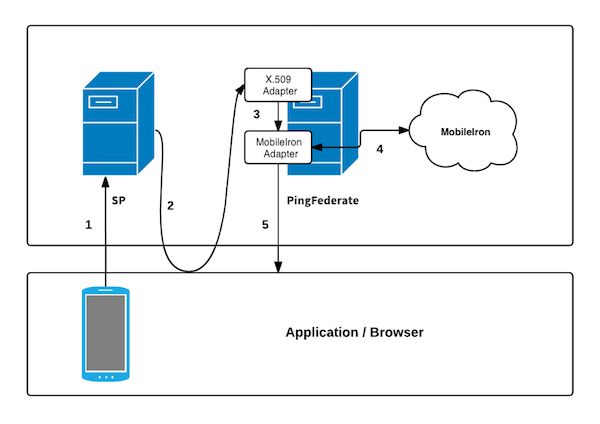
The following figure shows a basic single sign-on (SSO) scenario in which a PingFederate server authenticates users to an service provider (SP) application using the MobileIron Adapter and X.509 Adapter.
Description
-
A user requests access to an SP resource through a device enrolled with MobileIron. The request is redirected to PingFederate to perform X.509 authentication.
-
The browser requests the user’s X.509 certificate. The PingFederate X.509 Certificate Adapter validates that certificate against a list of issuers.
If you didn’t specify any issuers during the adapter setup, the adapter uses the server’s list of trusted certificate authorities instead.
-
During validation, the X.509 Certificate Adapter parses the device identifier from the certificate and passes it to the MobileIron Adapter.
-
The MobileIron Adapter uses the device identifier to contact the MobileIron Device API to retrieve the device’s posture.
-
The API returns the result of the authentication. If authentication was successful, the user is redirected to the requested resource.