Select Identity Provider node
The Select Identity Provider node presents an end user with a list of configured, enabled, social identity providers to use for authentication.
Use this node with the Social Provider Handler node for social authentication.
|
You can configure this node to show only the identity providers the user has already associated with their account. This is useful, for example, in account claiming flows, where a user wants to associate a new social identity provider with an account that’s being authenticated through social authentication. In cases such as account claiming, where the user has already authenticated once and is linking a new identity provider,
the node only displays a local sign-in option if it detects that the user’s account has a |
Examples
Example 1: Social authentication
This example shows the Social Provider Handler and Select Identity Provider nodes in a social authentication journey.
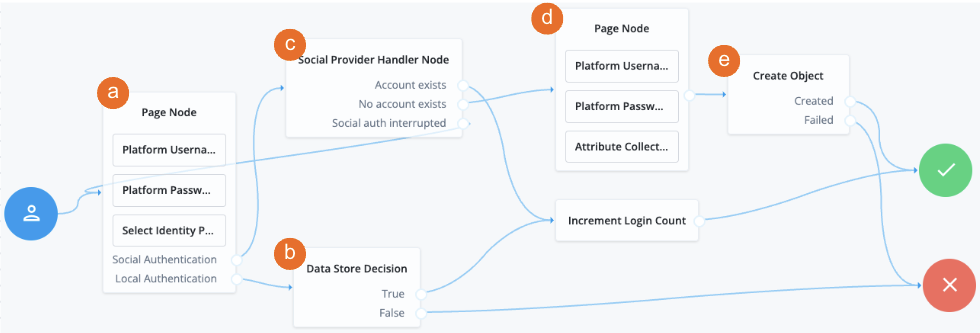
a The Page node containing the Select Identity Provider node prompts the user to select a social identity provider or to authenticate with a username and password.
b If the user selects local authentication, the Data Store Decision node takes care of the authentication.
c If the user selects social authentication, the Social Provider Handler node does the following:
-
Routes the user to the selected social provider to authenticate there
-
Retrieves the user’s profile information, and transforms it into a format that Advanced Identity Cloud can use
-
Assesses whether the user has an existing user account in Advanced Identity Cloud
-
If the user has an existing user account, authenticates that user
-
If the user doesn’t have a user account, routes the user to another page node
-
If the user interrupts the social authentication, routes the user back to the Select Identity Provider node
-
d The nodes on the page node request the information required to register a new user account.
e The Create Object node creates the new user account in Advanced Identity Cloud.
Example 2: Dynamic account linking
This example shows a social authentication journey with dynamic account linking.
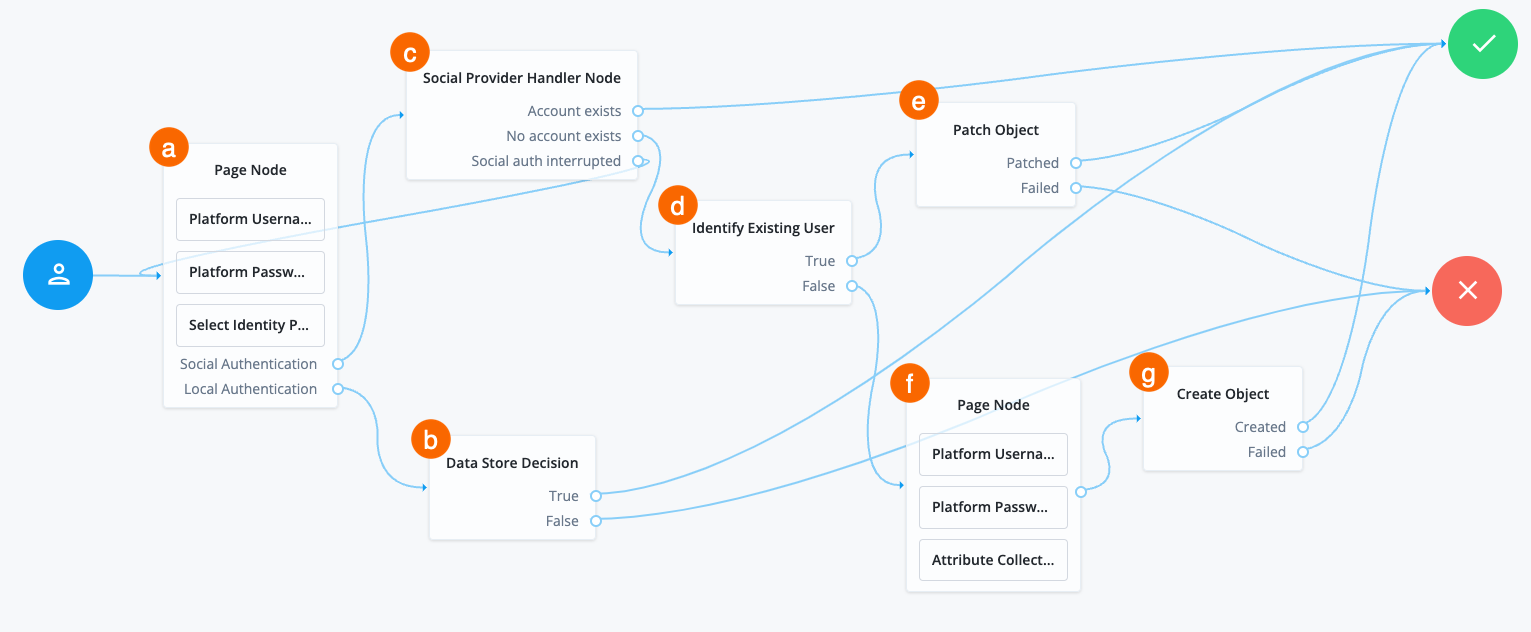
a A Page node contains the Select Identity Provider node node that prompts the user to select a social identity provider or to authenticate with a username and password.
b If the user selects local authentication, the Data Store Decision node takes care of the authentication.
c If the user selects social authentication, the Social Provider Handler node does the following:
-
Routes the user to the selected social provider to authenticate there
-
Retrieves the user’s profile information, and transforms it into a format that Advanced Identity Cloud can use
-
Assesses whether the user has an existing user account in Advanced Identity Cloud
-
If the user has an existing user account, authenticates that user
-
If the user doesn’t have a user account, routes the user to the Identify Existing User node
-
If the user interrupts the social authentication, routes the user back to the Select Identity Provider node
-
d The Identify Existing User node checks if the user exists in Advanced Identity Cloud using the Identity Attribute specified and does the following:
-
If the user exists, routes the user to the Patch Object node
-
If the user doesn’t exist, routes the user to another page node
e The Patch Object node updates the existing user to create the link.
f The nodes on the page node request the information required to register a new user account.
g The Create Object node creates the new user account in Advanced Identity Cloud.
Example 3: Login journey with multiple authentication options
The following example journey lets the user authenticate using social authentication, a username and password, or a passkey:
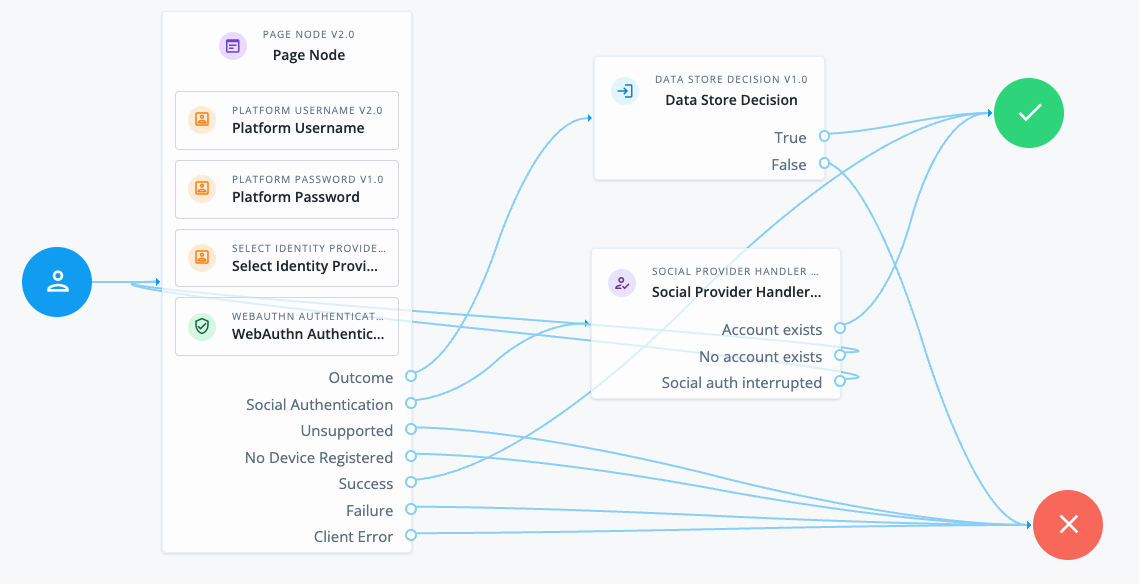
The v2.0 Page node provides the user with different authentication options on the same page.
The Page node contains the following nodes:
-
Platform Username node. This node uses the following configuration to provide users with relevant autofill suggestions, including passkeys if they’re available:
- Autocomplete Values
-
username
webauthn
The autocomplete values must be in this order.
-
Select Identity Provider node. This node is configured to include local authentication.
-
WebAuthn Authentication node. This node is v2.0 and uses the following configuration to provide the WebAuthn conditional UI and Sign in with passkey button:
- Username from device
-
Enabled - Mediation
-
CONDITIONAL - Authentication Button
-
Enabled
The standalone nodes must be added after the non-standalone nodes.
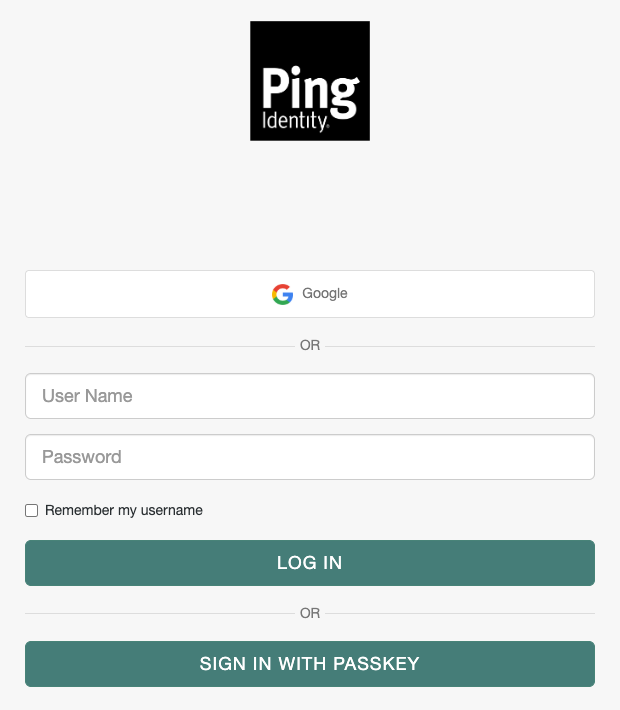
This Page node configuration presents a Sign in page to the user similar to the following:
-
If the user chooses Google in this example, the Social Provider Handler node routes the user to Google to authenticate. If authentication is successful, the user follows the
Account existspath. Otherwise, they can try a different authentication method. -
If the user clicks in the User Name field, they are shown any relevant username and passkey autofill suggestions.
-
If they select a passkey and authenticate successfully, they follow the
Successpath. -
If they enter their username and password (local authentication), they follow the
Outcomepath to the Data Store Decision node. This node validates their credentials and authenticates the user if they’re valid.
-
-
If they click the Sign in with a passkey button, they can select a saved passkey to authenticate with. If authentication is successful, they follow the
Successpath.
Availability
| Product | Available? |
|---|---|
PingOne Advanced Identity Cloud |
Yes |
PingAM (self-managed) |
Yes |
Ping Advanced Identity Software (self-managed) |
Yes |
Inputs
The node reads the username and password from shared state.
Implement a Platform Username node and a Platform Password node earlier in the journey.
Dependencies
The Social Identity Provider service must be configured with the details of at least one social identity provider.
Find more information on this service in Social Identity Provider Service.
Configuration
| Property | Usage | ||
|---|---|---|---|
Include local authentication |
Whether local authentication is included as a method for authenticating. This option must be enabled when this node is used in a Page node. |
||
Offer only existing providers |
When enabled, the node limits the social identity provider choices to those already associated with the user object. Use this when a user is authenticating using a new social identity provider, and an account associated with that user already exists (also known as "account claiming"). |
||
Password attribute |
The attribute in the user object that stores a user’s password for use during local authentication. |
||
Identity Attribute |
The attribute used to identify an existing user. The node uses this attribute to query the user in the backend datastore to obtain the list of existing providers. |
||
Filter Enabled Providers |
By default, the node displays all identity providers marked as Enabled in the Social Identity Provider Service. Enter one or more providers here to restrict the user’s choice of providers to this list.
Providers you specify here must be enabled in the Social Identity Provider service. If this field is empty, the node displays all enabled providers. |
Outputs
The node writes the selected social identity provider to the shared state in the SELECTED_IDP key.
Callbacks
The node sends a SelectIdPCallback to display the list of social identity providers to the end user. This callback is sent only if there’s more than one provider configured, or if a single provider is configured and Local Authentication is enabled.
Outcomes
Social Authentication-
The user chooses to authenticate using a social identity provider.
Local Authentication-
The user chooses to authenticate using local authentication, for example, by entering a username and password. This outcome is only available if Include local authentication is enabled.