Page node
The Page node lets you combine multiple nodes that request input onto a single page for display to the user. For example, you can use it to create a single login page that requests a username and password.
| The Page node can only include nodes that use callbacks to request input. |
To use it, drag and drop compatible nodes onto the Page node in the journey editor.
When designing a journey that includes a Page node, consider the following points:
-
A Page node must contain at least one node.
-
Page nodes can’t be nested inside each other. Similarly, you can’t include an Inner Tree Evaluator node in a Page node.
-
Page nodes are designed to group nodes together that require user input. Non-interactive nodes, such as the Data Store Decision node or Push Sender node, should be placed outside of Page nodes.
-
Scripted Decision nodes can be included in Page nodes but only if they handle callbacks.
Scripts that use the
Actionclass to set messages (using fields such aslockoutMessageorerrorMessage) aren’t supported within a Page node. -
Only the final node can have multiple outcomes. All preceding nodes must have a single outcome path.
-
v2.0 and later Page nodes: A Page node can contain one or more standalone nodes after the final multiple outcome node. Standalone nodes are self-contained and are processed separately to the other nodes in the Page node.
Which nodes are standalone nodes?
The following nodes are standalone nodes:
Example
Example 1: Simple login journey
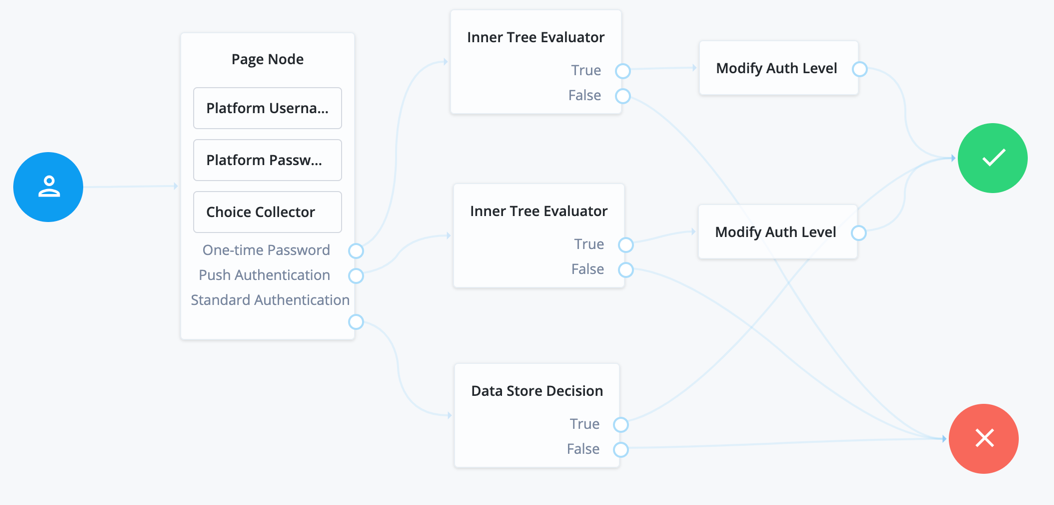
The following example uses a Page node containing a Platform Username node, Platform Password node, and Choice Collector node:
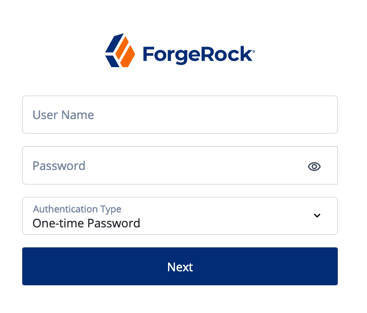
The flow prompts the user for all input on a single page:
Example 2: Login journey with multiple standalone nodes
The following example journey uses a Page node containing a Platform Username node, Platform Password node, Select Identity Provider node, and a WebAuthn Authentication node:
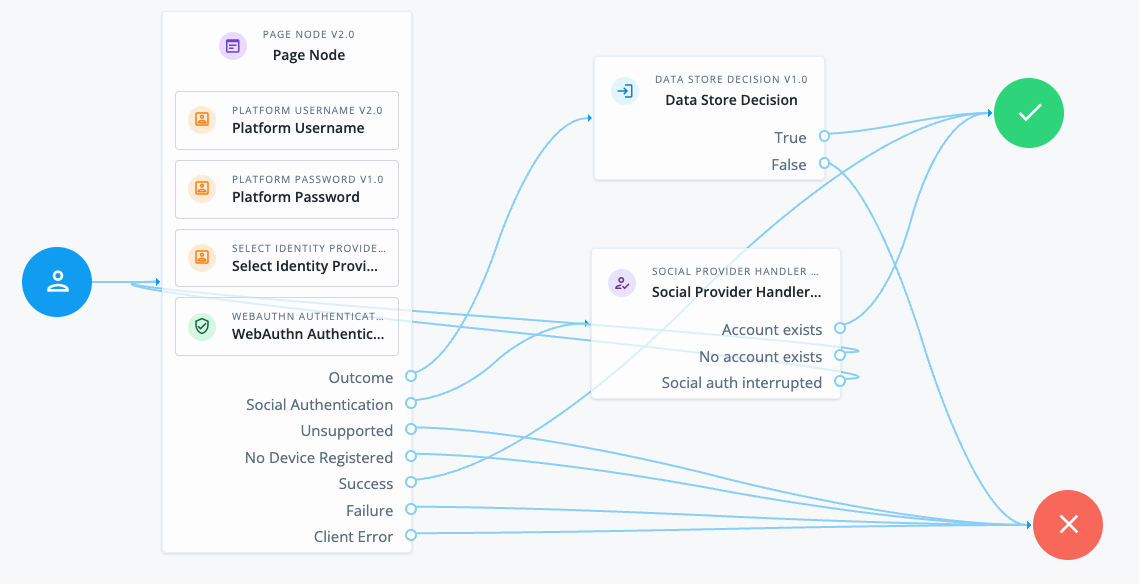
The v2.0 Page node provides the user with different authentication options on the same page.
The Page node contains the following nodes:
-
Platform Username node. This node uses the following configuration to provide users with relevant autofill suggestions, including passkeys if they’re available:
- Autocomplete Values
-
username
webauthn
The autocomplete values must be in this order.
-
Select Identity Provider node. This node is configured to include local authentication.
-
WebAuthn Authentication node. This node is v2.0 and uses the following configuration to provide the WebAuthn conditional UI and Sign in with passkey button:
- Username from device
-
Enabled - Mediation
-
CONDITIONAL - Authentication Button
-
Enabled
The standalone nodes must be added after the non-standalone nodes.
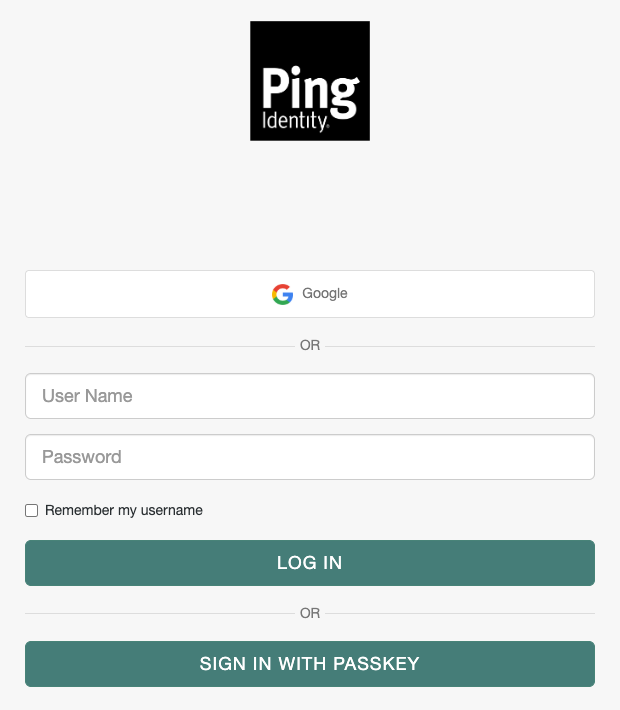
This Page node configuration presents a Sign in page to the user similar to the following:
-
If the user chooses Google in this example, the Social Provider Handler node routes the user to Google to authenticate. If authentication is successful, the user follows the
Account existspath. Otherwise, they can try a different authentication method. -
If the user clicks in the User Name field, they are shown any relevant username and passkey autofill suggestions.
-
If they select a passkey and authenticate successfully, they follow the
Successpath. -
If they enter their username and password (local authentication), they follow the
Outcomepath to the Data Store Decision node. This node validates their credentials and authenticates the user if they’re valid.
-
-
If they click the Sign in with a passkey button, they can select a saved passkey to authenticate with. If authentication is successful, they follow the
Successpath.
Availability
| Product | Available? |
|---|---|
PingOne Advanced Identity Cloud |
Yes |
PingAM (self-managed) |
Yes |
Ping Advanced Identity Software (self-managed) |
Yes |
Configuration
| Property | Usage | Availability | ||
|---|---|---|---|---|
Page Header |
Optional. A localized title for the Page node and the nodes contained within it. Use this when components of an authentication journey need a title. For example, dividing a registration flow into labeled sections. |
All node versions |
||
Page Description |
Optional. A localized description for the Page node and the nodes contained within it. Use this when you need additional descriptive text in an authentication journey. You can use HTML code to format the description. |
All node versions |
||
Stage |
Optional. A stage name to pass to the client to aid in rendering.
|
All node versions |
||
Submit Button Text |
Optional. Use the Key and Value fields to set the text of the Submit button. |
All node versions |
||
Page Footer |
Optional. A localized footer for the page node and the nodes contained within it. Use this when you need additional descriptive text in an authentication journey. You can use HTML code to format the description. |
All node versions |
||
Theme |
Optional. If using hosted pages, specify a theme to override this journey’s UI theme. |
All node versions |
|
This node’s optional properties are passed in the response, but a self-hosted or custom UI must support these properties to make them visible to the end user. |
Outcomes
The outcomes depend on whether the Page node contains standalone nodes. Standalone nodes can only be included from v2.0 onwards.
- Without standalone nodes
-
The outcomes are determined by the final node in the Page node.
- With standalone nodes
-
The available outcomes include the following:
-
All outcomes from the standalone nodes.
-
The outcomes determined by the last node prior to the standalone nodes:
-
If this node has a single outcome path, a single outcome is available. This outcome is typically called
Outcome. -
If this node has multiple outcome paths, they’re all available.
-
-
Errors
This node can log the following error messages:
| Message | Notes |
|---|---|
|
The <node-name> could not retrieve required properties from the shared node state |
|
The <node-name> could not retrieve required properties to include in the shared node state |
|
Failed to find the account profile with this |
|
Failed to update the account status; applies when locking and unlocking the account |
This node can throw exceptions with the following messages during operation:
| Message | Notes |
|---|---|
|
A Page node must contain at least one other node |
|
Failed to get to an outcome while processing the contained nodes |
|
Failed to access the properties of a contained node |
This node can throw exceptions with the following messages when saving the journey:
| Message | Notes |
|---|---|
|
A Page node can’t contain a <node-type> |
|
The contained nodes must have at least a single outcome path |
|
Consider rearranging the contained nodes |
|
Use the journey editor to fix the problem |
|
Use the journey editor to fix the problem |
|
Use the journey editor to fix the problem |
Changelog
| Version | Changes |
|---|---|
Improved handling of In earlier Page node versions, all nodes were reprocessed during |
|
Added support for standalone nodes within a Page node. Standalone nodes are self-contained and can be included after the final multiple outcome node. |