Certificate Collector node
The Certificate Collector node collects an X.509 digital certificate or a chain of certificates from the incoming request. The journey can then use the collected certificates as authentication credentials for a user or an OAuth 2.0 client.
By default, Advanced Identity Cloud collects the first certificate in a certificate chain (the user certificate).
Create an ESV variable named esv-am-nodes-certificatechain-validation-enforced and set its value to true to collect the chain of certificates.
Advanced Identity Cloud accepts certificates in PEM and DER format.
| You can’t use this node in isolation because it only collects certificates from the request. It doesn’t extract or validate the certificate’s content. Use a Certificate Validation node to validate certificates and a Certificate User Extractor node to extract the user details from the certificate. |
Example
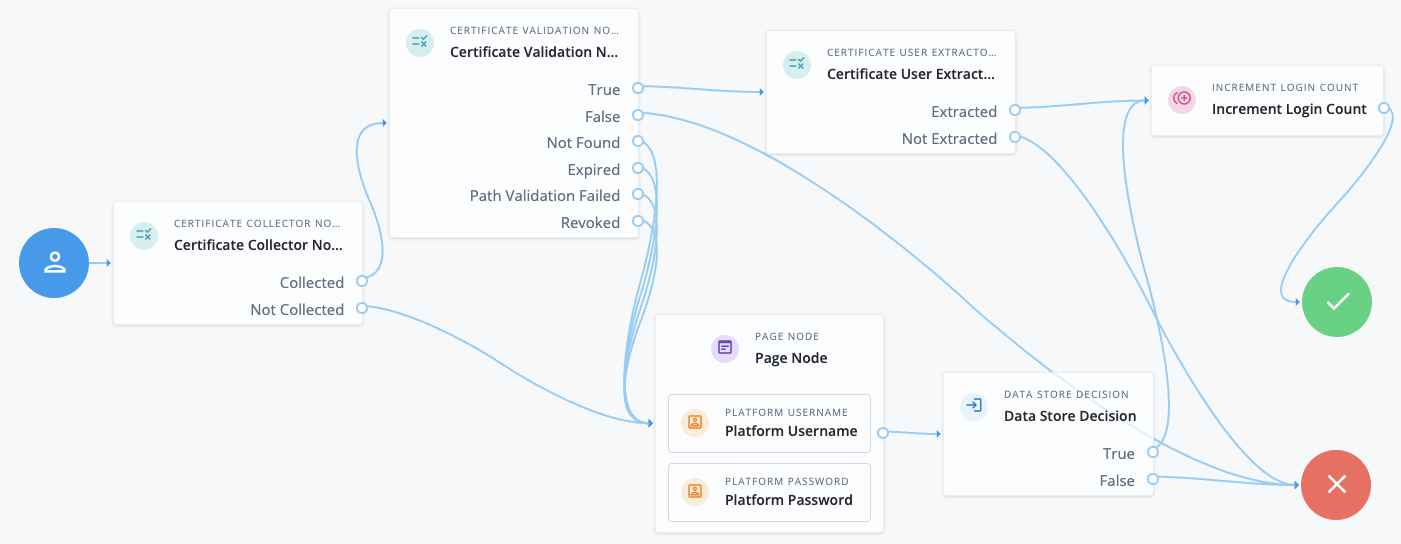
This example shows an authentication journey using a certificate as credentials.
-
The Certificate Collector node attempts to collect the certificate from the request body or the header.
-
If the node can collect the certificate, the journey proceeds to the Certificate Validation node.
-
If the node can’t collect the certificate, the journey proceeds to a Page node containing a Platform Username node and a Platform Password node to let the user authenticate with username/password credentials.
-
-
The Certificate Validation node attempts to validate the certificate based on the configuration of that node.
-
If the certificate can be validated, the journey proceeds to the Certificate User Extractor node.
-
If the certificate is invalid, the journey proceeds to the Failure node.
-
In all other cases, the journey proceeds to a Page node containing a Platform Username node and a Platform Password node to let the user authenticate with username/password credentials.
-
-
The Certificate User Extractor node extracts the user ID from the certificate and attempts to find a match in the identity store.
-
If the username can be extracted and a matching user is found in the identity store, the journey increments the login count and authenticates the user.
-
If the username can’t be extracted or no matching user is found in the identity store, the journey proceeds to the Failure node.
-
Availability
| Product | Available? |
|---|---|
PingOne Advanced Identity Cloud |
Yes |
PingAM (self-managed) |
Yes |
Ping Advanced Identity Software (self-managed) |
Yes |
Inputs
This node reads the certificate or chain of certificates from the request payload or request header. It doesn’t read anything from the shared state.
Configuration
| Property | Usage |
|---|---|
Certificate Collection Method |
How the node should collect the certificate or chain of certificates from the request. Possible values are:
Default: |
HTTP Header Name for the Client Certificate |
The name of the HTTP header that contains the certificates.
If you set the Certificate Collection Method to Default: No value |
Trusted Remote Hosts |
A list of IP addresses trusted to supply certificates on behalf of the authenticating client, such as load balancers doing TLS termination. If you don’t set a value here, Advanced Identity Cloud rejects certificates supplied by remote hosts.
If you set a value of Default: No value |
Outputs
The node outputs the X.509 certificate or chain of certificates to the transient state to be consumed by the Certificate Validation node.
Outcomes
Collected-
The node was able to collect the certificates.
Not Collected-
The node was unable to collect the certificates.
Errors
-
If no certificates are provided in the configured location (either header or request), the node logs the following error:
Certificate was not successfully collected based on node configuration and client request -
If there’s a problem with the certificates provided in the header or in the request, the node logs the following error:
CertificateFromParameter decode failed, possibly invalid Base64 input