Platform Username node
The Platform Username node prompts the user to enter their username and stores it in a configurable property of the shared node state.
Example
The following journey uses a Page node containing the Platform Username node and Platform Password node to collect the username and password and set their values in the shared node state:
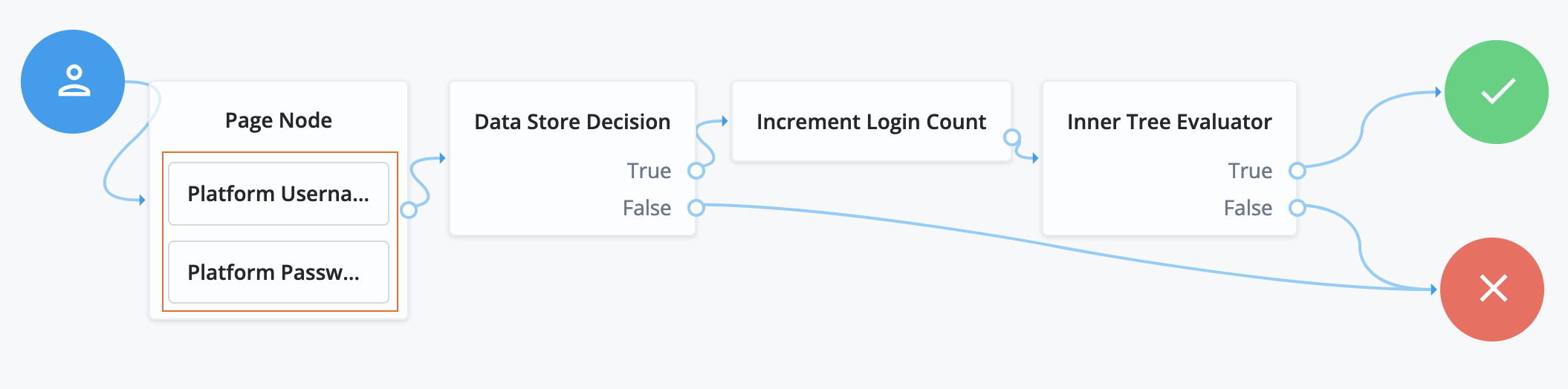
a The Page node presents a page with input fields to prompt for the username and password.
-
The Platform Username node collects and injects the
userNameinto the shared node state. -
The Platform Password node collects and injects the
passwordinto the shared node state.
b The Data Store Decision node locates the user in the backend identity store and determines if the credentials are correct:
-
If the credentials are correct, the journey progresses to the Increment Login Count node.
-
If the credentials aren’t correct, the journey progresses to the Retry Limit Decision node.
c The Increment Login Count node updates the login count on successful authentication.
d The Retry Limit Decision node determines how many times the user has attempted these credentials:
-
If the number of attempts doesn’t exceed the maximum, the user is redirected to the Platform Username node to attempt their credentials again.
-
If the number of attempts exceeds the maximum, the journey follows the failure outcome.
e The Inner Tree Evaluator node invokes a nested journey for progressive profiling.
Availability
| Product | Available? |
|---|---|
PingOne Advanced Identity Cloud |
Yes |
PingAM (self-managed) |
Yes (1) |
Ping Advanced Identity Software (self-managed) |
Yes |
(1) This functionality requires that you configure AM as part of a Ping Advanced Identity Software deployment.
Inputs
- Version 1.0
-
None. This node doesn’t read shared state data.
- Version 2.0
-
If the Prepopulate Username option is enabled, the node reads the
usernamefrom the shared state if it’s available.
Configuration
| Property | Usage | Availability | ||
|---|---|---|---|---|
Validate Username |
When enabled, this node uses username policies to validate the user’s input. It returns any policy failures as errors.
Default: Not enabled |
All node versions |
||
Username Attribute |
The attribute used to store a username in the managed identity object. Default: |
All node versions |
||
Prepopulate Username |
Whether the node should prepopulate the Default: Not enabled |
|||
Autocomplete Values |
(Optional) Enter one or more autocomplete values. These values provide autofill suggestions to the user when they’re prompted for their username. Make sure you only use standard autocomplete values that are defined in the HTML specification to ensure browsers can recognize them and provide relevant suggestions. For example, if you enter
|
All node versions |
Callbacks
The node sends either a ValidatedUsernameCallback or a NameCallback to prompt the user for their username. The callback sent depends on whether the Validate Username option is enabled or not.
Callbacks
-
If Validate Username isn’t set, the node uses a NameCallback to prompt the user for their username.
-
If Validate Username is set, the node uses a ValidatedCreateUsernameCallback to prompt the user for their username, apply policies, and validate the response.