Certificate Validation node
The Certificate Validation node validates the X.509 digital certificate or chain of certificates collected by the Certificate Collector node.
|
Certificate validation rules
|
Example
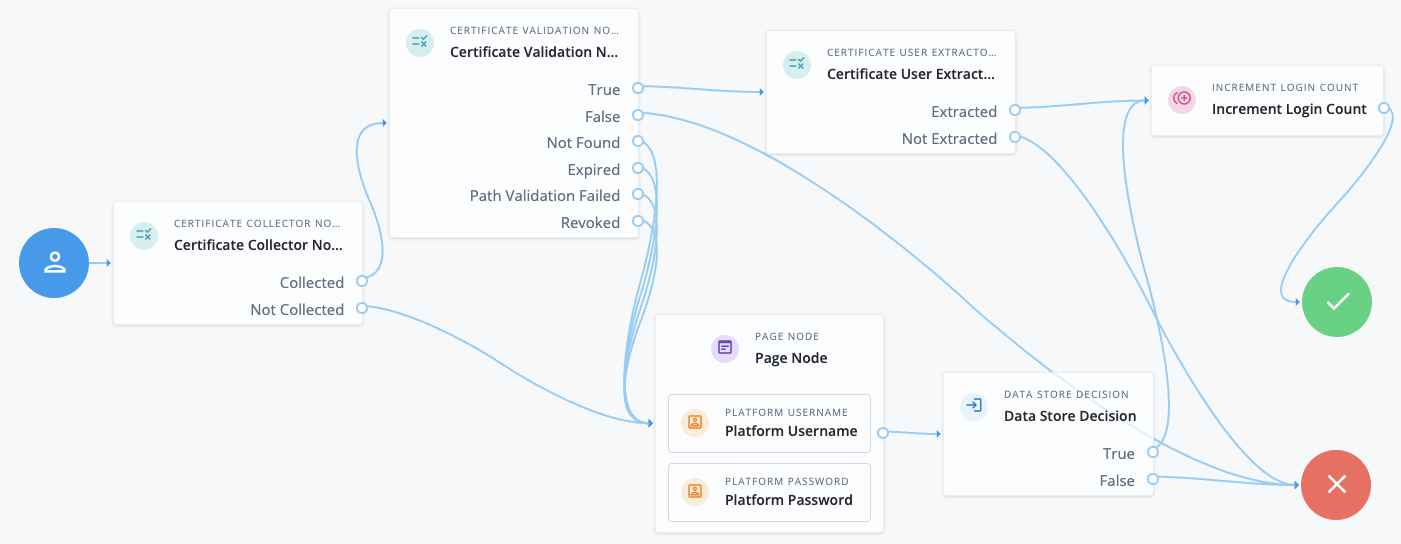
This example shows an authentication journey using a certificate as credentials.
-
The Certificate Collector node attempts to collect the certificate from the request body or the header.
-
If the node can collect the certificate, the journey proceeds to the Certificate Validation node.
-
If the node can’t collect the certificate, the journey proceeds to a Page node containing a Platform Username node and a Platform Password node to let the user authenticate with username/password credentials.
-
-
The Certificate Validation node attempts to validate the certificate based on the configuration of that node.
-
If the certificate can be validated, the journey proceeds to the Certificate User Extractor node.
-
If the certificate is invalid, the journey proceeds to the Failure node.
-
In all other cases, the journey proceeds to a Page node containing a Platform Username node and a Platform Password node to let the user authenticate with username/password credentials.
-
-
The Certificate User Extractor node extracts the user ID from the certificate and attempts to find a match in the identity store.
-
If the username can be extracted and a matching user is found in the identity store, the journey increments the login count and authenticates the user.
-
If the username can’t be extracted or no matching user is found in the identity store, the journey proceeds to the Failure node.
-
Availability
| Product | Available? |
|---|---|
PingOne Advanced Identity Cloud |
Yes |
PingAM (self-managed) |
Yes |
Ping Advanced Identity Software (self-managed) |
Yes |
Inputs
This node requires an X509Certificate property in the incoming node state.
Implement the Certificate Collector node as input to the Certificate Validation node.
Configuration
| Property | Usage |
|---|---|
Match Certificate in LDAP |
When enabled, Advanced Identity Cloud matches the collected certificates with a certificate stored in the identity store. Set the Subject DN Attribute Used to Search LDAP for Certificates to specify which LDAP property to search for certificate information. Default: Not enabled |
Check Certificate Expiration |
When enabled, Advanced Identity Cloud checks if the collected certificates have expired. Default: Not enabled |
Subject DN Attribute Used to Search LDAP for Certificates |
The attribute Advanced Identity Cloud uses to search the identity store for the certificates. The search filter is based on this attribute and the value of the Subject DN as it appears in the certificate. Default: |
Match Certificate to CRL |
When enabled, Advanced Identity Cloud checks if the collected certificates have been revoked according to a Certificate Revocation List (CRL) in the identity store. Define related CRL properties later in the node configuration. Default: Not enabled. |
Issuer DN Attribute(s) Used to Search LDAP for CRLs |
The name of the attribute or attributes in the issuer certificate that Advanced Identity Cloud uses to locate the CRL in the identity store.
Default: |
HTTP Parameters for CRL Update |
Parameters Advanced Identity Cloud includes in any HTTP CRL call to the CA that issued the certificate. If the client or CA certificate includes the Add the parameters as key-value pairs in a comma-separated list (,).
For example, |
Cache CRLs in Memory |
When enabled, Advanced Identity Cloud caches CRLs in memory. If this option is enabled, Update CA CRLs from CRLDistributionPoint must also be enabled. Default: Enabled |
Update CA CRLs from CRLDistributionPoint |
When enabled, Advanced Identity Cloud fetches new CA CRLs from the CRL Distribution Point and updates them in the identity store.
If the CA certificate includes either the Default: Enabled |
OCSP Validation |
When enabled, Advanced Identity Cloud checks the validity of certificates using the Online Certificate Status Protocol (OCSP). Default: Not enabled |
Certificate Identity Store |
Select the default identity store ( |
LDAP Server Where Certificates are Stored |
This property doesn’t apply to Advanced Identity Cloud. |
LDAP Search Start or Base DN |
This property doesn’t apply to Advanced Identity Cloud. |
LDAP Server Authentication User and LDAP Server Authentication Password |
This property doesn’t apply to Advanced Identity Cloud. |
mTLS Enabled |
This property doesn’t apply to Advanced Identity Cloud. |
mTLS Secret Label Identifier |
This property doesn’t apply to Advanced Identity Cloud. |
Use SSL/TLS for LDAP Access |
This property doesn’t apply to Advanced Identity Cloud. |
Outcomes
True-
The node could validate the certificates.
When the outcome is
True, add a Certificate User Extractor node to extract the values of the user certificate. False-
The node couldn’t validate the certificates. The journey follows this path when the node can’t validate the certificates and there isn’t a more specific outcome available.
Not found-
The Match Certificate in LDAP property is enabled, but the certificates weren’t found in the LDAP store.
Expired-
The Check Certificate Expiration property is enabled, and the certificates have expired.
Path Validation Failed-
The Match Certificate to CRL property is enabled, and the certificate path is invalid.
Revoked-
The OCSP Validation property is enabled, and the certificates have been revoked.