Username Collector node
Not supported in Advanced Identity Cloud
The Username Collector node prompts the user for their username.
Example
This simple login journey demonstrates the Username Collector node.
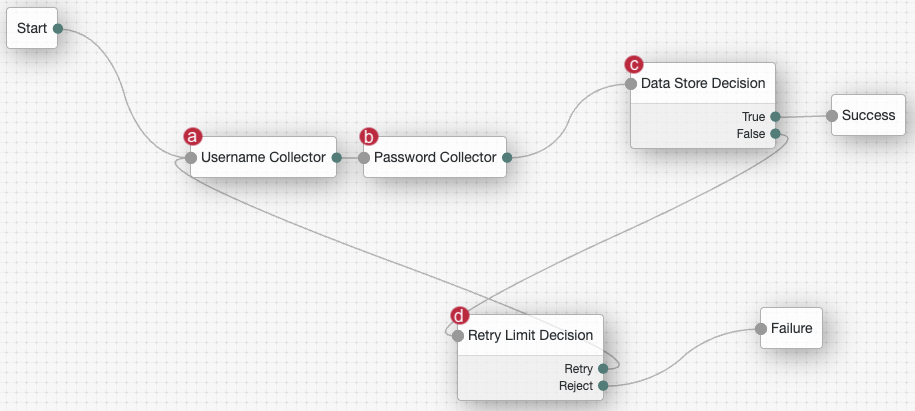
a The Username Collector node node prompts the user to enter their username.
b The Password Collector node node prompts the user to enter their password.
c The Data Store Decision node locates the user in the backend identity store and determines if the credentials are correct:
-
If the credentials are correct, the journey follows the succcess outcome and the user is authenticated.
-
If the credentials aren’t correct, the node directs the user to the Retry Limit Decision node.
d The Retry Limit Decision node determines how many times the user has attempted these credentials:
-
If the number of attempts doesn’t exceed the maximum, the user is redirected to the Username Collector node to attempt their credentials again.
-
If the number of attempts exceeds the maximum, the journey follows the failure outcome.
Availability
| Product | Available? |
|---|---|
PingOne Advanced Identity Cloud |
No |
PingAM (self-managed) |
Yes |
Ping Advanced Identity Software (self-managed) |
No |
Inputs
- Version 1.0
-
None. This node doesn’t read shared state data.
- Version 2.0
-
If the Prepopulate Username option is enabled, the node reads the
usernamefrom the shared state, if it’s available.
Configuration
| Property | Usage | Availability | ||
|---|---|---|---|---|
Prepopulate Username |
Whether the node should prepopulate the Default: Not enabled |
|||
Autocomplete Values |
(Optional) Enter one or more autocomplete values. These values provide autofill suggestions to the user when they’re prompted for their username. Make sure you only use standard autocomplete values that are defined in the HTML specification to ensure browsers can recognize them and provide relevant suggestions. For example, if you enter
|
All node versions |
Callbacks
The node sends a NameCallback to prompt the user for their username.