Password update
Password update lets end users update their passwords without assistance from an administrator.
PingOne Advanced Identity Cloud includes an UpdatePassword journey template. Unlike the other self-service journey templates, the update password journey assumes the end user is already signed on and gets the end user’s current session data to identify the end user. It then presents a prompt to update the end user’s password and uses a Patch Object node to update the password. An example of where you might use a journey like this is in an update password link placed in the end user’s profile or settings.
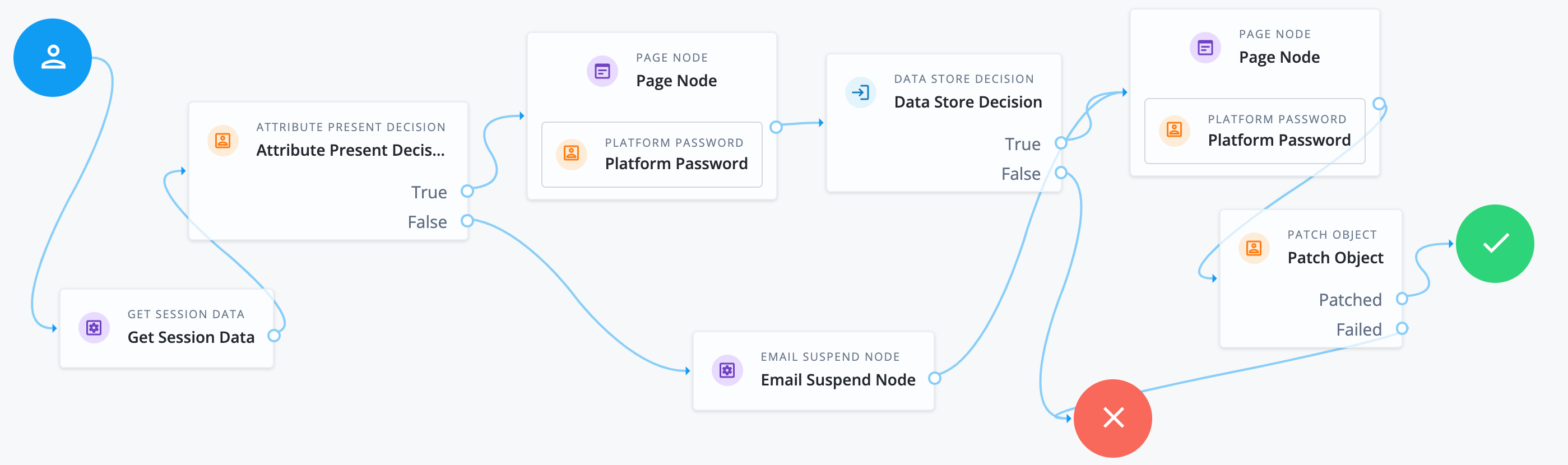
Make sure that the Patch Object node's Patch As Object field is not selected (equivalent to false).
|
To let end users update their password through the hosted account pages profile page using the Reset link, you set a self-service journey for the password update journey. The default journey is UpdatePassword.
To change the journey for password updates:
-
In the Advanced Identity Cloud admin console, go to Authentication > Self Service Journeys.
-
If the Status is inactive, click Activate to enable it.
-
In the Journey list next to
updatePassword, select the journey you want to use. -
Click Save.