Webex Connector
| This is a SaaS common connector. |
The Webex connector allows you to manage users and groups between Webex Control Hub and Advanced Identity Cloud or IDM. A Webex administrator account is required for the connector to work.
Install the Webex connector
|
To check for an Advanced Identity Cloud application for this connector, refer to: |
You can download most connectors from Backstage, but some are included in the default deployment for Advanced Identity Cloud, IDM, or RCS. When using an included connector, you can skip installing it and move directly to configuration.
| Connector | IDM | RCS |
|---|---|---|
No |
No |
Download the connector .jar file from Backstage.
-
If you’re running the connector locally, place it in the
/path/to/openidm/connectorsdirectory, for example:mv ~/Downloads/webex-connector-1.5.20.35.jar /path/to/openidm/connectors/
-
If you’re using a remote connector server (RCS), place it in the
/path/to/openicf/connectorsdirectory on the RCS.
Webex requirements
In Webex, set up a Webex integration application:
-
Create a Webex developer account.
-
Create an integration application. Add the required scopes to manage users, groups, licenses, and roles. Minimum scope required:
-
spark-admin:people_write -
spark-admin:people_read -
spark-admin:licenses_read -
spark-admin:roles_read -
identity:groups_rw -
identity:groups_read
-
-
Save the client secret and client ID.
-
If you’re configuring the connector using REST, get a refresh token.
A refresh_token isn’t required when configuring the connector using the UI. -
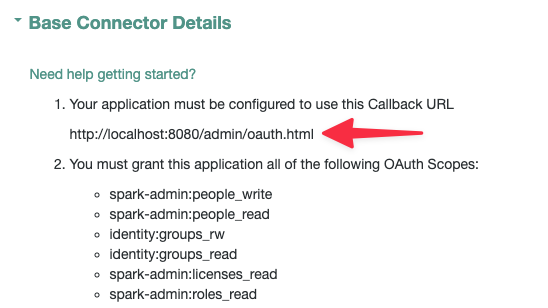
In another browser tab, start configuring the connector. When you get to the Base Connector Details, copy the Callback URL.
Show Me
-
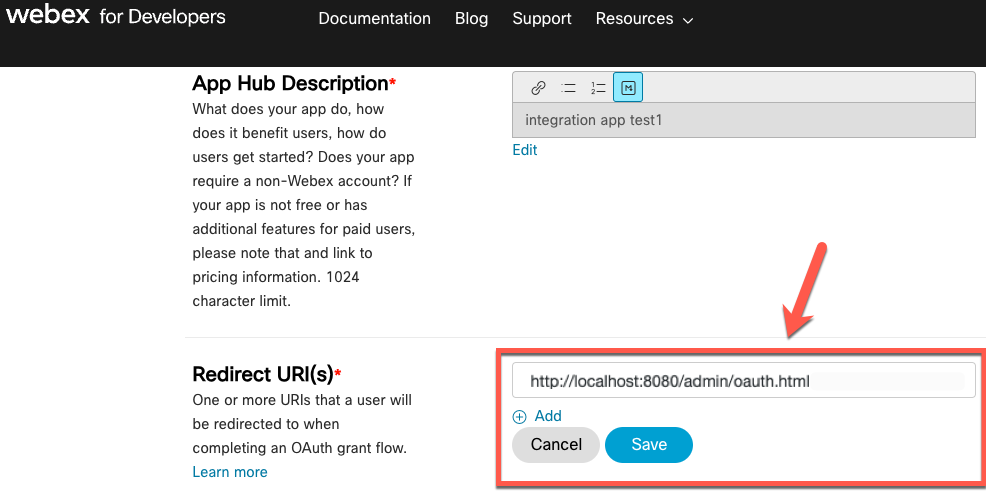
In Webex, in your Webex integration application Redirect URI(s) area, paste the redirect URI, and click Save.
Show Me
-
Continue configuring the connector.
Configure the Webex connector
Create a connector configuration using the IDM admin UI:
-
From the navigation bar, click Configure > Connectors.
-
On the Connectors page, click New Connector.
-
On the New Connector page, type a Connector Name.
-
From the Connector Type list, select Webex Connector - 1.5.20.35.
-
Complete the Base Connector Details and any applicable Additional Options.
For a list of all configuration properties, refer to Webex Connector Configuration. -
Click Save.
When your connector is configured correctly, the connector displays as Active in the admin UI.
Refer to this procedure to create a connector configuration over REST.
Base Connector Details
| Field | Description |
|---|---|
Webex Endpoint |
The service endpoint URI. |
Use Basic Auth For OAuth Token Neg |
The authentication method for the refresh token (Basic Authentication or sending the Client ID and Client Secret in the header). |
Max connections |
Maximum size of the HTTP connection pool. |
Connection Timeout (seconds) |
Timeout for the underlying HTTP connection in seconds. |
Authentication
| Field | Description |
|---|---|
Token Endpoint |
The OAuth 2.0 access token endpoint. |
Client ID |
The client identifier for OAuth 2.0 flow. |
Client Secret |
The client secret for OAuth 2.0 flow. |
Refresh Token |
The refresh token for OAuth 2.0. |
Additional Options
| Field | Description |
|---|---|
Read rate limit |
Throttling for read operations. |
Write rate limit |
Throttling for write operations (create/update/delete). |
Object Types
You can add or edit your object types.
__ACCOUNT__
| Property name | Type | Native type | Required |
|---|---|---|---|
|
String |
String |
NO |
|
String |
String |
NO |
|
String |
String |
NO |
|
String |
String |
YES |
|
Array |
String |
YES |
|
String |
String |
NO |
|
Array |
String |
YES |
|
Array |
String |
NO |
|
Array |
String |
NO |
|
String |
String |
NO |
|
String |
String |
NO |
|
String |
String |
NO |
|
String |
String |
NO |
|
String |
String |
NO |
|
String |
String |
NO |
|
String |
String |
NO |
|
Array |
String |
NO |
|
Array |
Object |
NO |
|
Array |
Object |
NO |
__GROUP__
| Property name | Type | Native type | Required |
|---|---|---|---|
|
String |
String |
NO |
|
String |
String |
YES |
|
String |
String |
NO |
|
String |
String |
NO |
|
Array |
Object |
NO |
Licenses
| Property name | Type | Native type | Required |
|---|---|---|---|
|
String |
String |
NO |
|
String |
String |
NO |
|
Integer |
Integer |
NO |
|
Integer |
Integer |
NO |
|
String |
String |
NO |
|
String |
String |
NO |
|
String |
String |
NO |
If configuring the connector over REST or through the filesystem, specify the connection details to the Webex resource provider in the configurationProperties for the connector. If you’re using OAuth for your connection, the minimum required properties are serviceUri, tokenEndpoint, refreshToken, clientId, and clientSecret.
The readRateLimit and writeRateLimit fields are for limiting the rate of requests. The recommended rate is 2.5.
Sample Configuration
{
    "configurationProperties" : {
        "tokenExpiration" : null,
        "accessToken" : null,
        "serviceUri" : "https://webexapis.com/v1",
        "readRateLimit" : "2.5",
        "login" : null,
        "password" : null,
        "writeRateLimit" : "2.5",
        "authenticationMethod" : "OAUTH",
        "tokenEndpoint" : "https://webexapis.com/v1/access_token",
        "clientId" : "k3..........5g",
        "clientSecret" : "xxxxxxxxxxxxxxxxxx",
        "refreshToken" : "xxxxxxxxxxxxxxxxxx",
        "authToken" : null,
        "acceptSelfSignedCertificates" : false,
        "disableHostNameVerifier" : false,
        "disableHttpCompression" : false,
        "clientCertAlias" : null,
        "clientCertPassword" : null,
        "maximumConnections" : "10",
        "httpProxyHost" : null,
        "httpProxyPort" : null,
        "httpProxyUsername" : null,
        "httpProxyPassword" : null,
        "connectionTimeout" : "30",
        "grantType" : "refresh_token",
        "scope" : null,
        "authorizationTokenPrefix" : "Bearer",
        "useBasicAuthForOauthTokenNeg" : true
    }
}
On startup, IDM encrypts the value of the clientSecret and refreshToken.
|
Configure connection pooling
The Webex connector supports HTTP pooling, which can substantially improve the performance of the connector. Learn more about the basic connection pooling configuration and different pooling mechanisms described in Connection pooling configuration.
Mapping
No transformation scripts are required for synchronization. Each row maps a source attribute to a target attribute.
Webex users ⇒ Advanced Identity Cloud or IDM users
| Source | Target |
|---|---|
|
|
|
|
|
|
|
|
|
|
|
|
|
|
|
|
|
|
|
|
|
|
|
|
|
|
|
|
|
|
|
|
|
|
|
|
Advanced Identity Cloud or IDM users ⇒ Webex users
| Source | Target |
|---|---|
|
|
|
|
|
|
|
|
|
|
|
|
|
|
|
|
|
|
|
|
|
|
|
|
|
|
|
|
|
|
|
|
|
|
|
|
Webex groups ⇒ Advanced Identity Cloud or IDM groups
| Source | Target |
|---|---|
|
|
|
|
|
|
|
|
|
|
From Advanced Identity Cloud or IDM groups ⇒ Webex groups
| Source | Target |
|---|---|
|
|
|
|
|
|
|
|
Test the Webex connector
Test that the Webex connector is configured correctly:
curl \
--header "X-OpenIDM-Username: openidm-admin" \
--header "X-OpenIDM-Password: openidm-admin" \
--header 'Accept-API-Version: resource=1.0' \
--request POST \
'http://localhost:8080/system/webex?_action=test'
{
    "name": "webex",
    "enabled": true,
    "config": "config/provisioner.openicf/webex",
    "connectorRef": {
        "bundleVersion": "1.5.20.35",
        "bundleName": "org.forgerock.openicf.connectors.webex-connector",
        "connectorName": "org.forgerock.openicf.connectors.webex.WebexConnector"
    },
    "displayName": "Webex Connector",
    "objectTypes": [
        "__GROUP__",
        "__ACCOUNT__",
        "ROLES",
        "__ALL__",
        "LICENSES"
    ],
    "ok": true
}
Use the Webex connector
User
Create user
To create a user, it is necessary to at least provide the email and displayName fields. Some fields,
such as extension, locationId, or siteUrls require their respective licenses. Field locationId requires the extension field,
and locationId and phoneNumbers fields are mutually exclusive.
It is possible that licenses will be added by default, so it is advisable to perform a reconciliation to be up to date.
If you create a user with a role or license (bad format) that is not allowed to be assigned or with an incorrect avatar URL, the user is still created with the exception of the fields that failed:
curl \
--header "X-OpenIDM-Username: openidm-admin" \
--header "X-OpenIDM-Password: openidm-admin" \
--header 'Content-Type: application/json' \
--request POST \
--data '{
    "displayName" : "John Doe",
    "firstName" : "John",
    "LastName" : "Doe",
    "groups" : [
            "groupId",
            "groupId"
    ],
    "emails" : [
        "john.doe@example.com"
    ],
    "licenses" : [
        "licenseId"
    ],
    "roles" : [
        "roleId"
    ],
    "extension" : "123",
    "avatar" : "urlAvatar",
    "title" : "Title",
    "department" : "Sales",
    "manager" : "Manager Name",
    "managerId" : "managerId",
    "phoneNumbers": [
        {
          "type": "work",
          "value": "+1 010 110 1101"
        }
    ],
    "addresses": [
        {
          "type": "work",
          "country": "US",
          "locality": "Milpitas",
          "region": "California",
          "streetAddress": "1111 Bird Ave.",
          "postalCode": "010101"
        }
    ],
    "siteUrls": [
        "mysite.webex.com#attendee"
    ],
    "orgId" : "orgId",
    "locationId" : "locationId"
}'\
'http://localhost:8080/openidm/system/webex/__ACCOUNT__?_action=create'
{
    "_id" : "userId",
    "displayName" : "John Doe",
    "firstName" : "John",
    "LastName" : "Doe",
    "groups" : [
            "groupId",
            "groupId"
    ],
    "emails" : [
        "john.doe@example.com"
    ],
    "licenses" : [
        "licenseId"
    ],
    "roles" : [
        "roleId"
    ],
    "extension" : "123",
    "avatar" : "urlAvatar",
    "title" : "Title",
    "department" : "Sales",
    "manager" , "Manager Name",
    "managerId" : "managerId",
    "phoneNumbers": [
        {
          "type": "work",
          "value": "+1 010 110 1101"
        }
    ],
    "addresses": [
        {
          "type": "work",
          "country": "US",
          "locality": "Milpitas",
          "region": "California",
          "streetAddress": "1111 Bird Ave.",
          "postalCode": "010101"
        }
    ],
    "siteUrls": [
        "mysite.webex.com#attendee"
    ],
    "orgId" : "orgId",
    "locationId" : "locationId"
}
Get Users
Retrieve a list of user ids from Webex. By default, retrieves all users:
curl \
--header "X-OpenIDM-Username: openidm-admin" \
--header "X-OpenIDM-Password: openidm-admin" \
--header 'Content-Type: application/json' \
--request GET \
'http://localhost:8080/openidm/system/webex/__ACCOUNT__?_queryId=query-all-ids'
{
    "result": [
        {
            "_id" : "001"
        },
        {
            "_id" : "002"
        },
        {
            "_id" : "003"
        },
    ],
    "resultCount": 999,
    "pagedResultsCookie": null,
    "totalPagedResultsPolicy": "NONE",
    "totalPagedResults": -1,
    "remainingPagedResults": -1
}
Get user
Retrieve a user from Webex. The user id must be provided in the URI path.
The locationId and extension fields will only be displayed if they have their corresponding license:
curl \
--header "X-OpenIDM-Username: openidm-admin" \
--header "X-OpenIDM-Password: openidm-admin" \
--header 'Content-Type: application/json' \
--request GET \
'http://localhost:8080/openidm/system/webex/__ACCOUNT__/ID'
{
    "_id" : "userId",
    "displayName" : "active",
    "firstName" : "active",
    "LastName" : "active",
    "groups" : [
            "groupId",
            "groupId",
    ],
    "emails" : [
        "test@email.com"
    ],
    "licenses" : [
        "licenseId"
    ],
    "roles" : [
        "roleId"
    ],
    "extension" : "gs",
    "avatar" : "avatarURL",
    "title" : "surname",
    "department" : "Sales",
    "manager" , "John Doe",
    "managerId" : "managerId",
    "phoneNumbers": [
        {
          "type": "work",
          "value": "+1 010 110 1101"
        }
    ],
    "addresses": [
        {
          "type": "work",
          "country": "US",
          "locality": "Milpitas",
          "region": "California",
          "streetAddress": "1099 Bird Ave.",
          "postalCode": "99212"
        }
    ],
    "siteUrls": [
        "mysite.webex.com#attendee"
    ],
    "orgId" : true,
    "locationId" : "locationId"
}
Get user emails
Retrieve a user in Webex filtering by the emails field:
curl \
--header "X-OpenIDM-Username: openidm-admin" \
--header "X-OpenIDM-Password: openidm-admin" \
--header 'Content-Type: application/json' \
--request GET \
'http://localhost:8080/openidm/system/webex/__ACCOUNT__?_queryFilter=true&_fields=emails'
{
    "result": [
        {
            "_id" : "001",
            "emails": [
            "email001@example.wbx.ai"
            ],
        },
        {
            "_id" : "003",
            "emails": [
            "email003@example.wbx.ai"
            ],
        },
        {
            "_id" : "003",
            "emails": [
            "email003@example.wbx.ai"
            ],
        }
    ],
    "resultCount": 999,
    "pagedResultsCookie": null,
    "totalPagedResultsPolicy": "NONE",
    "totalPagedResults": -1,
    "remainingPagedResults": -1
}
Get user filter by email
Retrieve a user in Webex filtering by the emails field.
The locationId and extension fields will only be displayed if they have their corresponding license:
curl \
--header "X-OpenIDM-Username: openidm-admin" \
--header "X-OpenIDM-Password: openidm-admin" \
--header 'Content-Type: application/json' \
--request GET \
'http://localhost:8080/openidm/system/webex/__ACCOUNT__?_queryFilter=emails%20eq%20"john@example.wbx.ai"'
{
    "result": [
        {
            "_id": "userId",
            "firstName": "John",
            "displayName": "John Doe",
            "lastName": "Doe",
            "orgId": "orgId",
            "emails": [
                "john@example.wbx.ai"
            ],
            "roles": [
                "roleId"
            ],
            "groups": [],
            "licenses": [
                "licenseId"
            ],
            "__NAME__": "John"
        }
    ]
}
Get user filter starts with
Retrieve a user in Webex filtering by the displayName field. Minimum characters to search for displayName.
The locationId and extension fields will only be displayed if they have their corresponding license:
curl \
--header "X-OpenIDM-Username: openidm-admin" \
--header "X-OpenIDM-Password: openidm-admin" \
--header 'Content-Type: application/json' \
--request GET \
'http://localhost:8080/openidm/system/webex/__ACCOUNT__?_queryFilter=displayName%20sw%20"john"'
{
    "result": [
        {
            "_id": "userId",
            "firstName": "John",
            "displayName": "John Doe",
            "lastName": "Doe",
            "orgId": "orgId",
            "emails": [
                "john@example.wbx.ai"
            ],
            "roles": [
                "roleId"
            ],
            "groups": [
                "groupId_1",
                "groupId_2"
            ],
            "licenses": [
                "licenseId"
            ],
            "__NAME__": "John"
        }
    ],
    "resultCount": 1,
    "pagedResultsCookie": null,
    "totalPagedResultsPolicy": "NONE",
    "totalPagedResults": -1,
    "remainingPagedResults": -1
}
Update user
To update a user, it is necessary to at least provide the email, displayName and licenses fields. To update the
locationId, extension, and siteUrls fields, the user must have the corresponding licenses.
locationId requires the extension field. locationId and phoneNumbers are mutually exclusive:
curl \
--header "X-OpenIDM-Username: openidm-admin" \
--header "X-OpenIDM-Password: openidm-admin" \
--header 'Content-Type: application/json' \
--request PUT \
--data '{
    "displayName" : "John Doe",
    "firstName" : "John",
    "LastName" : "Doe",
    "groups" : [
            "groupId",
            "groupId"
    ],
    "emails" : [
        "john.doe@example.com"
    ],
    "licenses" : [
        "licenseId"
    ],
    "roles" : [
        "roleId"
    ],
    "extension" : "123",
    "avatar" : "urlAvatar",
    "title" : "Title",
    "department" : "Sales",
    "manager" , "Manager Name",
    "managerId" : "managerId",
    "phoneNumbers" : [
        {
          "type": "work",
          "value": "+1 010 110 1101"
        }
    ],
    "addresses" : [
        {
          "type": "work",
          "country": "US",
          "locality": "Milpitas",
          "region": "California",
          "streetAddress": "1111 Bird Ave.",
          "postalCode": "010101"
        }
    ],
    "siteUrls": [
        "mysite.webex.com#attendee"
    ],
    "orgId" : "orgId",
    "locationId" : "locationId"
}' \
'http://localhost:8080/system/webex/__ACCOUNT__/USER_ID'
{
    "_id" : "userId",
    "displayName" : "John Doe",
    "firstName" : "John",
    "LastName" : "Doe",
    "groups" : [
            "groupId",
            "groupId",
    ],
    "emails" : [
        "john.doe@example.com"
    ],
    "licenses" : [
        "licenseId"
    ],
    "roles" : [
        "roleId"
    ],
    "extension" : "123",
    "avatar" : "avatarURL",
    "title" : "Title",
    "department" : "Developer",
    "manager" , "Manager Name",
    "managerId" : "managerId",
    "phoneNumbers": [
        {
          "type": "work",
          "value": "+1 010 110 1101"
        }
    ],
    "addresses": [
        {
          "type": "work",
          "country": "US",
          "locality": "Milpitas",
          "region": "California",
          "streetAddress": "1111 Bird Ave.",
          "postalCode": "010101"
        }
    ],
    "siteUrls": [
        "mysite.webex.com#attendee"
    ],
    "orgId" : "orgId",
    "locationId" : "locationId"
}
| To update the licenses correctly, it is necessary to deactivate the default licenses and to have the option "Preserve licenses for users joining another group" activated in Webex Control Hub in the user licenses tab. |
Delete user
Delete a user from the Webex organization. The user id must be provided in the URI path:
curl \
--header "X-OpenIDM-Username: openidm-admin" \
--header "X-OpenIDM-Password: openidm-admin" \
--header 'Content-Type: application/json' \
--request DELETE \
'http://localhost:8080/openidm/system/webex/__ACCOUNT__/USER_ID'
{
    "_id" : "USER_ID",
    "email" : "deleted.member@email.com",
    ...
}
GROUPS
Create group
To create a group, it is necessary to at least provided displayName field:
curl \
--header "X-OpenIDM-Username: openidm-admin" \
--header "X-OpenIDM-Password: openidm-admin" \
--header 'Content-Type: application/json' \
--request POST \
--data '{
    "displayName" : "Group name",
    "description" : "Group Description",
    "orgId" : "orgId"
}' \
'http://localhost:8080/openidm/system/webex/__GROUP__?_action=create'
{
    "_id" : "groupId",
    "displayName" : "Group name",
    "description" : "Group Description",
    "orgId" : "orgId",
    "members": []
}
Get groups
Retrieve a list of groups showing only the ids. By default returns all groups:
curl \
--header "X-OpenIDM-Username: openidm-admin" \
--header "X-OpenIDM-Password: openidm-admin" \
--header 'Content-Type: application/json' \
--request GET \
'http://localhost:8080/openidm/system/webex/__GROUP__?_queryId=query-all-ids'
{
    "result": [
        {
            "_id" : "groupid1"
        },
        {
            "_id" : "groupId2"
        },
        {
            "_id" : "groupId3",
        },
        ...
    ],
    "resultCount": 999,
    "pagedResultsCookie": null,
    "totalPagedResultsPolicy": "NONE",
    "totalPagedResults": -1,
    "remainingPagedResults": -1
}
Update a group
The fields that can be updated for a group are description and displayName. The group id must be provided in the URI path:
curl \
--header "X-OpenIDM-Username: openidm-admin" \
--header "X-OpenIDM-Password: openidm-admin" \
--header 'Content-Type: application/json' \
--request PUT \
--header 'If-Match: *' \
--data '{
    "displayName" : "New Group Name",
    "description" : "New Description"
}' \
'http://localhost:8080/openidm/system/webex/__GROUP__/GROUP_ID'
{
    "_id" : "groupId",
    "displayName" : "New Group Name",
    "description" : "New Description",
    "orgId" : "orgId",
    "members": []
}
Delete a group
The group id must be provided in the URI path:
curl \
--header "X-OpenIDM-Username: openidm-admin" \
--header "X-OpenIDM-Password: openidm-admin" \
--header 'Content-Type: application/json' \
--request DELETE \
'http://localhost:8080/openidm/system/webex/__GROUP__/GROUP_ID'
{
    "_id" : "groupId",
    "displayName" : "New Group Name",
    "description" : "New Description",
    "orgId" : "orgId",
    "members": []
}
Get Roles
Retrieve a list of roles for Webex users.
curl \
--header "X-OpenIDM-Username: openidm-admin" \
--header "X-OpenIDM-Password: openidm-admin" \
--header 'Content-Type: application/json' \
--request GET \
'http://localhost:8080/openidm/system/webex/ROLES/?_queryFilter=true'
{
    "result" : [
        {
            "_id" : "roleId",
            "__NAME__" : "Role name",
        },
        ...
    ],
    "resultCount": 999,
    "pagedResultsCookie": null,
    "totalPagedResultsPolicy": "NONE",
    "totalPagedResults": -1,
    "remainingPagedResults": -1
}
Get Role
Retrieve a role from the Webex organization. The user id must be provided in the URI path:
curl \
--header "X-OpenIDM-Username: openidm-admin" \
--header "X-OpenIDM-Password: openidm-admin" \
--header 'Content-Type: application/json' \
--request GET \
'http://localhost:8080/openidm/system/webex/ROLES/ROLE_ID'
{
    "_id": "roleId",
    "__NAME__": "Role Name"
}
Get Licenses
Retrieve a list of licenses for Webex users.
curl \
--header "X-OpenIDM-Username: openidm-admin" \
--header "X-OpenIDM-Password: openidm-admin" \
--header 'Content-Type: application/json' \
--request GET \
'http://localhost:8080/openidm/system/webex/LICENSES/?_queryFilter=true'
{
    "result" : [
        {
            "_id" : "LicenseId",
            "name" : "Role Name",
            "totalUnits" : 50,
            "consumedUnits": 1,
            "subscriptionId": "subscriptionId",
            "siteUrl": "site1-example.webex.com",
            "siteType": "Control Hub managed site",
        },
        ...
    ],
    "resultCount": 999,
    "pagedResultsCookie": null,
    "totalPagedResultsPolicy": "NONE",
    "totalPagedResults": -1,
    "remainingPagedResults": -1
}
Get License
Retrieve a user license. The user id must be provided in the URI path:
curl \
--header "X-OpenIDM-Username: openidm-admin" \
--header "X-OpenIDM-Password: openidm-admin" \
--header 'Content-Type: application/json' \
--request GET \
'http://localhost:8080/openidm/system/webex/LICENSES/LICENSE_ID'
{
    "_id": "LicenseId",
    "name": "License Name",
    "totalUnits": "10",
    "subscriptionId": "subscriptionId",
    "siteType": "Control Hub managed site",
    "__NAME__": "License Name",
    "siteUrl": "sityUrl.webex.com"
}
OpenICF Interfaces Implemented by the Webex Connector
The Webex Connector implements the following OpenICF interfaces. For additional details, see ICF interfaces:
- Create
-
Creates an object and its
uid. - Delete
-
Deletes an object, referenced by its
uid. - Schema
-
Describes the object types, operations, and options that the connector supports.
- Script on Connector
-
Enables an application to run a script in the context of the connector.
Any script that runs on the connector has the following characteristics:
-
The script runs in the same execution environment as the connector and has access to all the classes to which the connector has access.
-
The script has access to a
connectorvariable that is equivalent to an initialized instance of the connector. At a minimum, the script can access the connector configuration. -
The script has access to any script arguments passed in by the application.
-
- Search
-
Searches the target resource for all objects that match the specified object class and filter.
- Test
-
Tests the connector configuration.
Testing a configuration checks all elements of the environment that are referred to by the configuration are available. For example, the connector might make a physical connection to a host that is specified in the configuration to verify that it exists and that the credentials that are specified in the configuration are valid.
This operation might need to connect to a resource, and, as such, might take some time. Do not invoke this operation too often, such as before every provisioning operation. The test operation is not intended to check that the connector is alive (that is, that its physical connection to the resource has not timed out).
You can invoke the test operation before a connector configuration has been validated.
- Update
-
Updates (modifies or replaces) objects on a target resource.
Webex Connector Configuration
The Webex Connector has the following configurable properties:
Basic Configuration Properties
| Property | Type | Default | Encrypted(1) | Required(2) |
|---|---|---|---|---|
|
|
|
|
Yes |
The service endpoint URI. |
||||
|
|
|
|
Yes |
Defines throttling for read operations either per seconds ( |
||||
|
|
|
|
Yes |
The service login name. |
||||
|
|
|
|
Yes |
Defines throttling for write operations (create/update/delete) either per second ( |
||||
|
|
|
Yes |
No |
The service user password. |
||||
|
|
|
|
Yes |
Defines which method is to be used to authenticate on the remote server. Options are |
||||
|
|
|
|
No |
When using OAUTH as authentication method, this property defines the endpoint where a new access token should be queried for (https://myserver.com/oauth2/token). |
||||
|
|
|
|
Yes |
The client identifier for OAuth2. |
||||
|
|
|
Yes |
No |
Secure client secret for OAuth2. |
||||
|
|
|
Yes |
No |
Static authentication token. |
||||
|
|
|
|
Yes |
To be used for debug/test purposes. To be avoided in production. |
||||
|
|
|
|
Yes |
To be used for debug/test purposes. To be avoided in production. |
||||
|
|
|
|
Yes |
Set this property to |
||||
|
|
|
|
Yes |
If TLS Mutual Auth is needed, set this to the certificate alias from the keystore. |
||||
|
|
|
Yes |
Yes |
If TLS Mutual Auth is needed and the client certificate (private key) password is different from the keystore password, set this to the client private key password. |
||||
|
|
|
|
Yes |
Defines the max size of the HTTP connection pool used. |
||||
|
|
|
|
Yes |
Defines the Hostname if an HTTP proxy is used between the connector and the service. |
||||
|
|
|
|
Yes |
Defines the Port if an HTTP proxy is used between the connector and the service. |
||||
|
|
|
|
Yes |
Defines Proxy Username if an HTTP proxy is used between the connector and the service. |
||||
|
|
|
Yes |
Yes |
Defines Proxy Password if an HTTP proxy is used between the connector and the service. |
||||
|
|
|
|
No |
Defines a timeout for the underlying HTTP connection in seconds. |
||||
|
|
|
|
No |
Used by the refresh_token grant type. |
||||
|
|
|
|
No |
The OAuth2 grant type to use ( |
||||
|
|
|
|
No |
The OAuth2 scope to use. |
||||
|
|
|
|
No |
The prefix to be used in the Authorization HTTP header for Token authentication. |
||||
|
|
|
|
Yes |
The Authentication method for refresh token (Basic Authentication or Sending the ClientId and Client Secret in the Header). |
||||
|
|
|
Yes |
No |
The JWT data structure that represents a cryptographic key. |
||||
|
|
|
|
No |
Defines the JWT expiration time in seconds. |
||||
|
|
|
|
No |
The Algorithm type to sign payload. |
||||
|
|
|
|
No |
JWT Claims to be included in the payload |
||||
|
|
|
Yes |
No |
The contents of the private key of the PEM file |
||||
|
|
|
Yes |
No |
The contents of the certificate of the PEM file |
||||
|
|
|
|
No |
Indicates the type of key (such as RSA, DSA or EC) used to sign from the PEM. |
||||
|
|
|
|
No |
The User Agent HTTP Header used by the connector. Defaults to |
||||
(1) Whether the property value is considered confidential, and is therefore encrypted in IDM.
(2) A list of operations in this column indicates that the property is required for those operations.