OATH Registration node
The OATH Registration node lets the user register a device for OATH-based multi-factor authentication (MFA).
Based on the node settings, the user device displays a QR code that includes all the details required for registration.
If registration is successful, the node stores the device data, and recovery codes (if enabled),
and sets the skippable attribute to prevent repeat registration at next login.
|
You can use the Combined MFA Registration node to register a device for both push notifications and one-time passcode (OATH) verification in a single step. |
Example
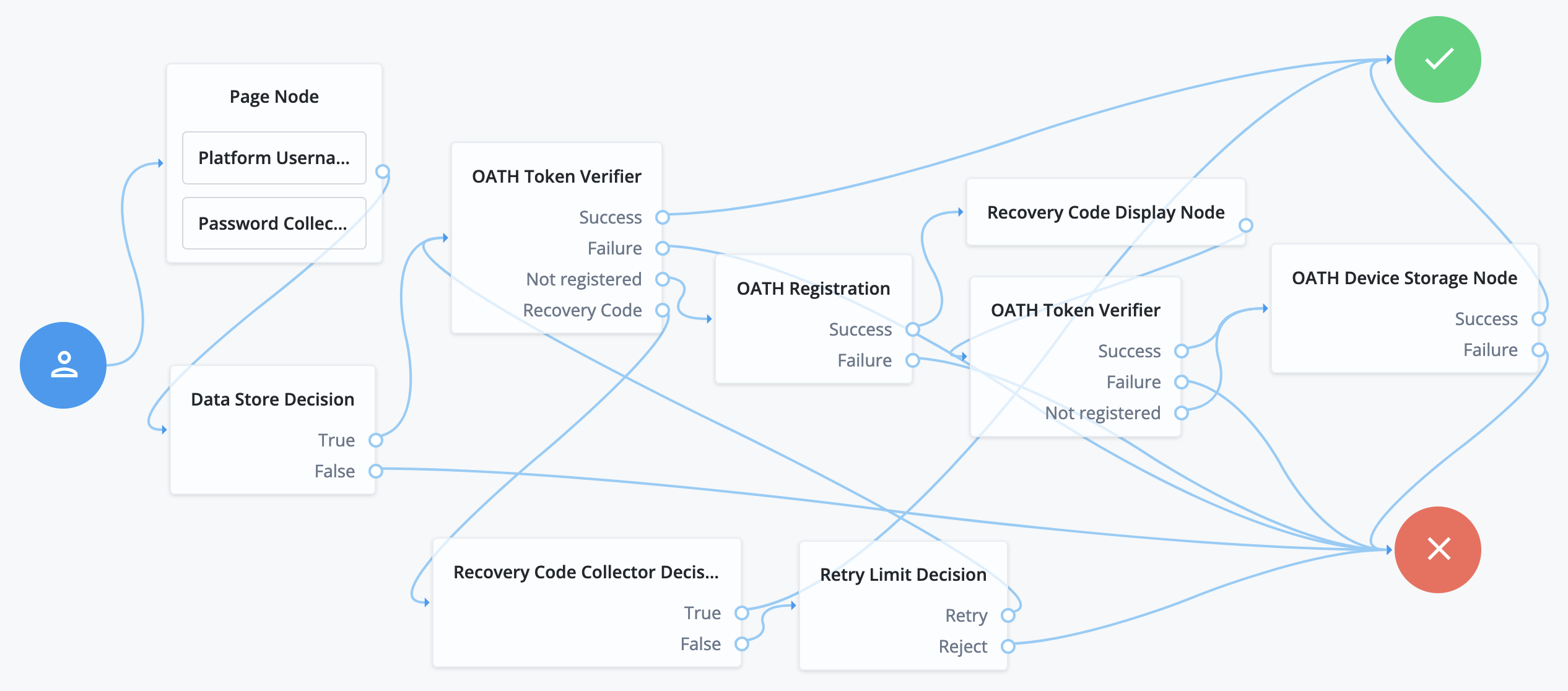
The following journey includes both username-password and one-time passcode authentication:
-
The Page node with the Platform Username node and the Platform Password node prompts for the user credentials.
-
The Data Store Decision node confirms the username-password credentials.
-
The first OATH Token Verifier node prompts for a one-time passcode with an option to use a recovery code.
-
The OATH Registration node prompts the user to register a device and includes its profile in the shared state.
-
The Recovery Code Display node shows the recovery codes and prompts the user to keep them safe.
-
The second OATH Token Verifier node prompts for a one-time passcode using the newly registered device.
-
The OATH Device Storage node writes the device profile to the user’s account.
-
The Recovery Code Collector Decision node prompts for a recovery code.
-
The Retry Limit Decision node lets the user retry another code if they enter one incorrectly.
Availability
| Product | Available? |
|---|---|
PingOne Advanced Identity Cloud |
Yes |
PingAM (self-managed) |
Yes |
Ping Identity Platform (self-managed) |
Yes |
Authenticators
The OATH-related nodes can integrate with the following authenticator apps:
-
The ForgeRock Authenticator app for Android and iOS.
-
Third-party authenticator apps that support the following open standards:
Inputs
This node reads the username attribute and optionally the oathDeviceProfile attribute from the shared state.
Implement a Username Collector node (standalone AM) or Platform Username node (Ping Identity Platform deployments) earlier in the journey.
Dependencies
Confirm the user credentials before letting them register a device. For example, precede this node with the following nodes earlier in the authentication flow:
-
Username Collector node (standalone AM) or Platform Username node (Ping Identity Platform deployment)
-
Password Collector node (standalone AM) or Platform Password node (Ping Identity Platform deployment)
Configuration
| Property | Usage | ||
|---|---|---|---|
Issuer |
The identifier that’s displayed on the user’s device, such as a company name, a website, or a realm. The authenticator app displays this value. Default: |
||
Account Name |
Select the profile attribute to display as the username in the authenticator app. If not specified, or if the specified profile attribute is empty, their username is used. Default: |
||
Background Color |
The background color in hex notation that displays behind the issuer’s logo within the authenticator app. Default: |
||
Logo Image URL |
The location of an image to download and display as the issuer’s logo within the authenticator app.
Default: none |
||
Generate Recovery Codes |
Select this option to generate and store recovery codes in the successful outcome’s transient state. Use the Recovery Code Display node to display the codes to the user for safekeeping. Default: |
||
QR code message |
A custom, localized message with instructions to scan the QR code to register the device. Add instructions
Leave blank to use the default message.(2) Default: none |
||
One Time Password Length |
The length of the generated OTP in digits. This value must be at least Default: |
||
Minimum Secret Key Length |
The number of hexadecimal characters allowed for the secret key. Default: |
||
OATH Algorithm |
Select the algorithm the device uses to generate the OTP. Possible values are:
Default: |
||
TOTP Time Step Interval |
The length of time that an OTP is valid in seconds. For example, if the time step interval is Default: |
||
TOTP Hash Algorithm |
The HMAC hash algorithm used to generate the OTP codes. Possible values are:
Default: |
||
HOTP Checksum Digit |
Select this option to add a digit to the end of the generated OTP. This is used as a checksum to verify the OTP was generated correctly. This is in addition to the actual password length. Only set this if the user devices support it. Default: |
||
HOTP Truncation Offset |
This is an option used by the HOTP algorithm that not all devices support. Leave the default value unless you know user devices use an offset. Default: |
||
Store device data in shared state |
Select this option to store the device data in the shared node state instead of in the user profile.
When selected, the node adds the device data as a base64-encoded string to the In the shared node state: Decoded value: Use the OATH Device Storage node to store the device data in the user profile instead.
Default: |
(1) Specify a
locale that Java supports, such as en-gb. Otherwise, the node throws a configuration exception with an Invalid locale provided message.
(2) Learn more about customizing and translating default messages in Internationalize nodes.
Outputs
If the Store device data in shared state setting is enabled,
this node records the device profile in the oathDeviceProfile shared state attribute.
If the Generate Recovery Codes setting is enabled,
this node records the recovery codes in the oathEnableRecoveryCode shared state attribute.
Callbacks
The node sends the following callbacks:
TextOutputCallback-
Contains the QR code message.
HiddenValueCallback-
Contains the registration URI used to generate the QR code.
QRCodeCallback-
Displays the QR code to the user.
ConfirmationCallback-
Lets the user continue after registering their device.
Learn more in Supported callbacks.