Password replay with AM
Password replay brings SSO to legacy web applications without the need to edit, upgrade, or recode them.
Use PingGateway with an appropriate AM authentication tree to capture and replay username password credentials. PingGateway and AM share a secret key to encrypt and decrypt the password and keep it safe.
When running PingOne Advanced Identity Cloud, read Password replay and PingOne Advanced Identity Cloud instead.
Request flow
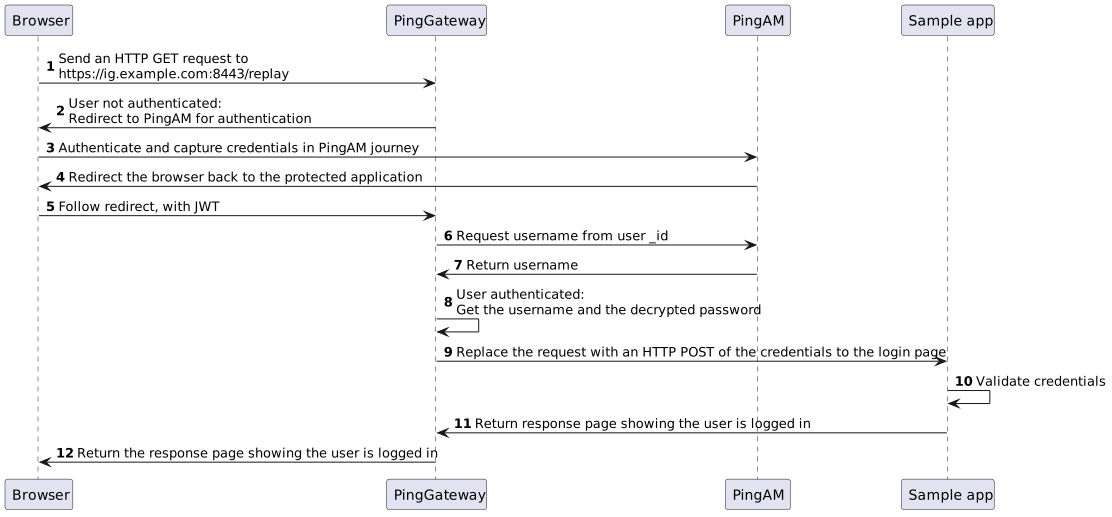
The following figure illustrates the flow of requests when an unauthenticated user accesses a protected application. After signing on with AM, the user signs on to the application with the username and password from AM.
-
PingGateway intercepts the browser’s HTTP GET request.
-
PingGateway redirects the user to AM for authentication.
-
AM authenticates the user and stores the encrypted password in a JWT.
-
AM redirects the browser back to the protected application with the JWT.
-
PingGateway intercepts the browser’s HTTP GET request again:
-
The user is authenticated.
-
PingGateway gets the password from the JWT and decrypts it.
-
PingGateway gets the username from AM based on the user
_id.
-
-
PingGateway replaces the request with an HTTP POST to the application, taking the credentials from the context.
-
The sample application validates the credentials from the HTTP POST request.
-
The sample application responds with the user’s profile page.
-
PingGateway passes the response from the sample application to the browser.
Tasks
Before you begin
Before you begin, prepare AM, PingGateway, and the sample application. Learn more in the example installation for this guide.
Task 1: Prepare a shared secret
PingGateway and AM share a secret symmetric key to encrypt and decrypt the password.
The AM authentication tree you will configure includes the JWT Password Replay node
to capture the password in an encrypted JWT it sends to PingGateway.
The JWT Password Replay node relies on a secret label of the form
am.authentication.nodes.jwt.replay.identifier.encryption to get the shared secret key.
This example uses pinggateway as the identifier and stores the shared secret
in a PEM file whose name is the secret label, am.authentication.nodes.jwt.replay.pinggateway.encryption.
When installing AM and PingGateway on the same computer, you can share the PEM file directly.
-
Create a
secretsfolder next to the PingGateway instance folder to store the shared secret key:$ mkdir secrets -
Generate a base64-encoded shared secret using the filename the JWT Password Replay node requires:
$ echo "-----BEGIN AES SECRET KEY-----" > secrets/am.authentication.nodes.jwt.replay.pinggateway.encryption
$ head -c32 /dev/urandom | base64 >> secrets/am.authentication.nodes.jwt.replay.pinggateway.encryption
$ echo "-----END AES SECRET KEY-----" >> secrets/am.authentication.nodes.jwt.replay.pinggateway.encryption
The file contains the base64-encoded shared secret in PEM format.
You have successfully added a shared secret in the PEM file, ready for AM and PingGateway to use.
Task 2: Configure AM
-
Select Realms > Top Level Realm > Secret Stores, click + Add Secret Store, and create the new secret store with these settings:
- Secret Store ID
-
Files - Store Type
-
File System Secret Volumes - Directory
-
Absolute path to the
secretsfolder you created - File format
-
PEM encoded certificate, key, or password
AM can now use the shared secret key stored in the PEM file,
secrets/am.authentication.nodes.jwt.replay.pinggateway.encryption. -
Select Realms > Top Level Realm > Services > Add a Service and add a Validation Service with the following Valid goto URL Resources:
-
https://ig.example.com:8443/* -
https://ig.example.com:8443/*?*
-
-
In the agent profile for PingGateway, add a redirect URI for CDSSO that PingGateway can use in the route for password replay.
Go to Applications > Agents > Identity Gateway > ig_agent, set Redirect URLs for CDSSO to
https://ig.example.com:8443/replay/redirect, and click Save Changes. -
Go to Authentication > Trees, click + Create Tree, and create an authentication tree named
Password replayconfigured with the nodes shown in this screenshot: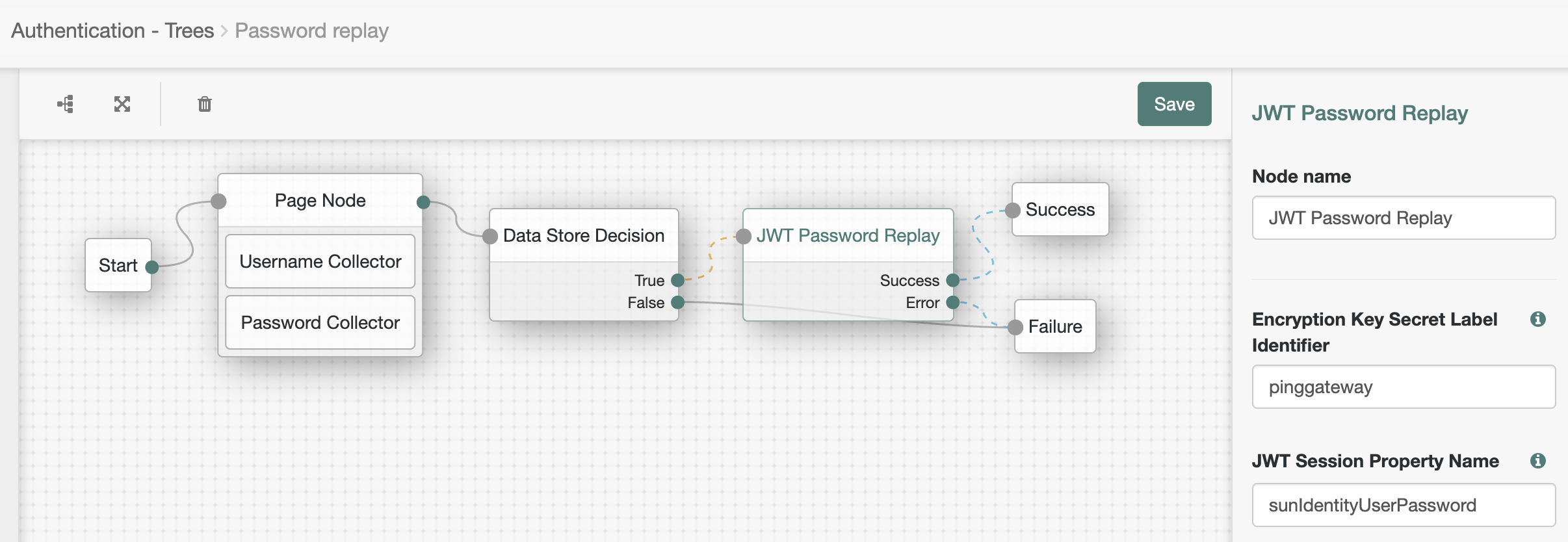
-
The Page node presents a page with input fields to prompt for the username and password.
-
The Username collector node collects and injects the
userNameinto the shared node state. -
The Password collector node collects and injects the
passwordinto the shared node state.
-
-
The Data Store Decision node uses the username and password to determine whether authentication is successful.
-
The JWT Password Replay node stores the password in a JWT encrypted with the shared secret key.
-
-
Make sure the test user can sign on with the tree before continuing.
To verify the tree works as expected, in your browser’s privacy or incognito mode, go to http://am.example.com:8088/openam/XUI/?service=Password%20replay#login and sing on as test user
demowith passwordCh4ng31t.On success, the browser displays the user’s profile page.
You have successfully configured AM for password replay.
Task 3: Configure PingGateway
The password replay configuration includes the PingGateway password to connect to AM, the shared secret, and the route for password replay.
-
Set up PingGateway for HTTPS.
Learn more in Configure PingGateway for TLS (server-side).
-
Make sure PingGateway connects to the sample application over HTTPS with a route to access static resources.
Learn more in Using the sample application.
-
Set an environment variable locally on the computer running PingGateway to access the base64-encoded agent password:
$ export AGENT_SECRET_ID='cGFzc3dvcmQ='PingGateway retrieves the password with a SystemAndEnvSecretStore, which requires it to be base64-encoded.
The password must match the agent profile password you set in AM. PingGateway uses the password to connect to AM.
-
Restart PingGateway to read the secrets from the environment.
-
Add a route for password replay:
- Linux
-
$HOME/.openig/config/routes/04-replay.json - Windows
-
%appdata%\OpenIG\config\routes\04-replay.json
{
  "name": "04-replay",
  "condition": "${find(request.uri.path, '^/replay')}",
  "properties": {
    "amInstanceUrl": "http://am.example.com:8088/openam/"
  },
  "heap": [
    {
      "name": "SystemAndEnvSecretStore-1",
      "type": "SystemAndEnvSecretStore"
    },
    {
      "name": "AmService-1",
      "type": "AmService",
      "config": {
        "agent": {
          "username": "ig_agent",
          "passwordSecretId": "agent.secret.id"
        },
        "secretsProvider": "SystemAndEnvSecretStore-1",
        "url": "&{amInstanceUrl}"
      }
    },
    {
      "name": "PemPropertyFormat-1",
      "type": "PemPropertyFormat"
    },
    {
      "name": "FileSystemSecretStore-1",
      "type": "FileSystemSecretStore",
      "config": {
        "format": "PLAIN",
        "directory": "&{ig.instance.dir}/../secrets/",
        "mappings": [
          {
            "secretId": "am.authentication.nodes.jwt.replay.pinggateway.encryption",
            "format": "PemPropertyFormat-1"
          }
        ]
      }
    },
    {
      "name": "CapturedUserPasswordFilter-1",
      "type": "CapturedUserPasswordFilter",
      "config": {
        "ssoToken": "${contexts.ssoToken.value}",
        "keySecretId": "am.authentication.nodes.jwt.replay.pinggateway.encryption",
        "secretsProvider": "FileSystemSecretStore-1",
        "amService": "AmService-1"
      }
    },
    {
      "name": "CrossDomainSingleSignOnFilter-1",
      "type": "CrossDomainSingleSignOnFilter",
      "config": {
        "redirectEndpoint": "/replay/redirect",
        "authCookie": {
          "path": "/replay",
          "name": "ig-token-cookie"
        },
        "amService": "AmService-1",
        "authenticationService": "Password replay"
      }
    },
    {
      "name": "UserProfileFilter-1",
      "type": "UserProfileFilter",
      "config": {
        "username": "${contexts.ssoToken.info.uid}",
        "userProfileService": {
          "type": "UserProfileService",
          "config": {
            "amService": "AmService-1",
            "profileAttributes": [
              "username"
            ]
          }
        }
      }
    },
    {
      "name": "PasswordReplayFilter-1",
      "type": "PasswordReplayFilter",
      "config": {
        "loginPage": "${true}",
        "credentials": "CapturedUserPasswordFilter-1",
        "request": {
          "method": "POST",
          "uri": "https://app.example.com:8444/login",
          "form": {
            "username": [
              "${contexts.userProfile.username}"
            ],
            "password": [
              "${contexts.capturedPassword.value}"
            ]
          }
        }
      },
      "capture": [
        "all"
      ]
    }
  ],
  "handler": {
    "type": "Chain",
    "config": {
      "filters": [
        "CrossDomainSingleSignOnFilter-1",
        "UserProfileFilter-1",
        "PasswordReplayFilter-1"
      ],
      "handler": "ReverseProxyHandler"
    }
  }
}
Source: 04-replay.json
The route:
-
Matches requests whose path starts with
/replay. -
Sets an
amInstanceUrlproperty to the URL for AM. -
Connects to AM as
ig_agentwith theagent.secret.idpassword from the localAGENT_SECRET_IDenvironment variable. -
Loads the shared secret key from the PEM file.
-
Extracts the captured password from the SSO token context and decrypts it with the shared secret key.
-
Uses a CrossDomainSingleSignOnFilter to redirect to the AM
Password replaytree for authentication, getting the authentication information from theig-token-cookie. -
Queries AM to retrieve the username for authentication.
You can retrieve other profile attributes with the UserProfileFilter, such as the email address or first and last names. The sample application expects the username in this example, so the route gets the username.
-
Signs on to the sample application with the username and password.
-
Returns the result to the browser.
In production, remove
"capture": ["all"]from the PasswordReplayFilter to avoid recording credentials in the logs.
Validation
-
In your browser’s privacy or incognito mode, go to https://ig.example.com:8443/replay/.
PingGateway redirects to the AM authentication tree.
-
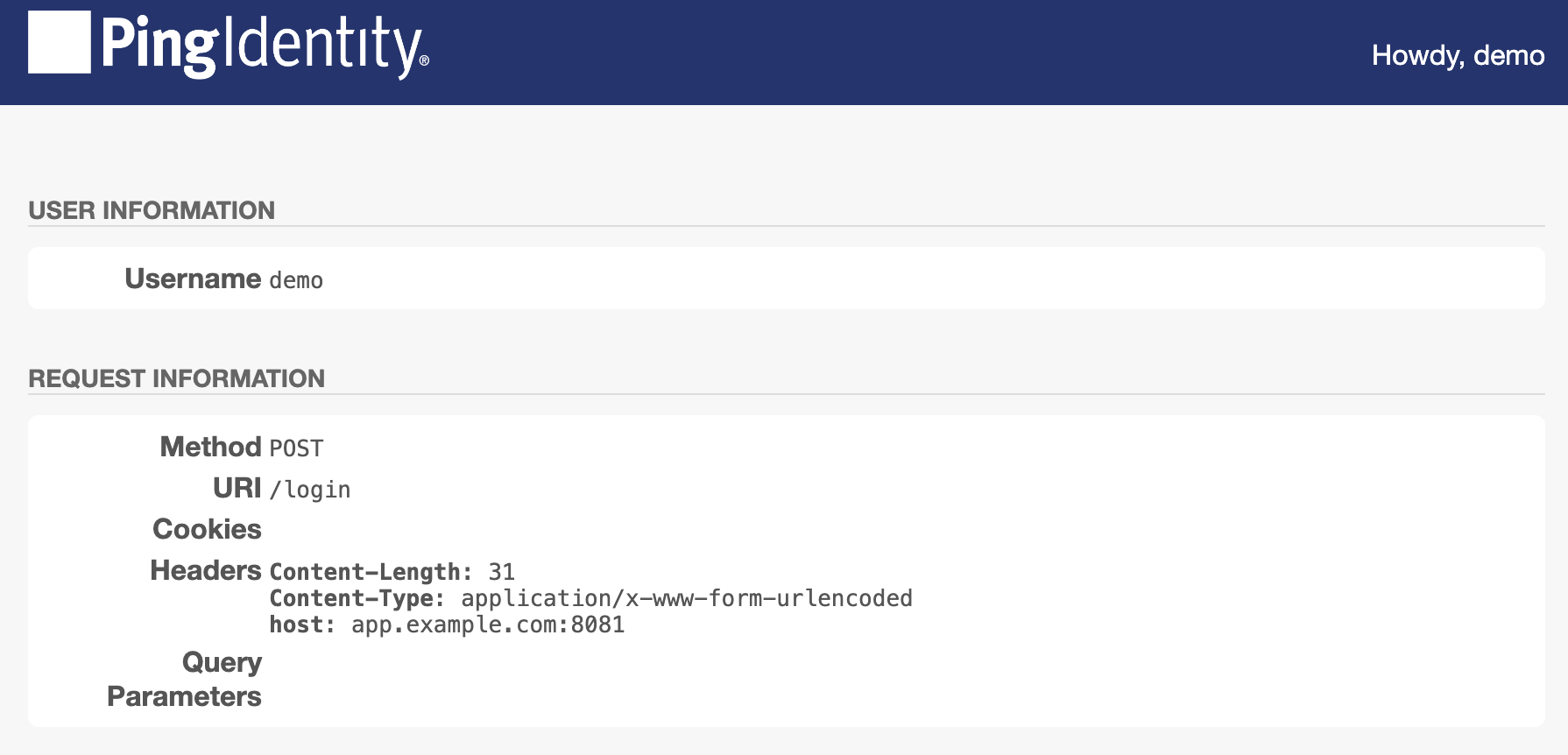
Sign on as test user
demowith passwordCh4ng31t.PingGateway successfully replays the credentials against the sample application. The sample application displays its user profile page:
-
Review the PingGateway output.
On success, the output displays the credentials and the profile page:
...INFO  o.f.o.d.c.C.c.PasswordReplayFilter-1 @04-replay -

[CONTINUED]--- (filtered-request) exchangeId:<id> - transactionId:<id> --->

[CONTINUED]POST https://app.example.com:8444/login HTTP/1.1
[CONTINUED]Content-Length: 31
[CONTINUED]Content-Type: application/x-www-form-urlencoded

[CONTINUED]password=Ch4ng31t&username=demo

...INFO  o.f.o.d.c.C.c.PasswordReplayFilter-1 @04-replay -

[CONTINUED]<--- (response) exchangeId:<id> - transactionId:<id> ---

[CONTINUED]HTTP/1.1 200 OK
...

[CONTINUED]<!DOCTYPE html>
...
You have successfully demonstrated password replay with PingGateway and AM.
If password replay fails, consider the outcome of the HTTP POST from PingGateway to the sample application:
- HTTP 401 Unauthorized
-
PingGateway isn’t replaying the credentials.
Review the PingGateway output to determine whether the username or password is missing when PingGateway replays the credentials.
If the password is missing, make sure PingGateway and AM share the same secret key.
- HTTP 403 Forbidden
-
PingGateway isn’t replaying the right credentials.
Make sure you’re using a username-password combination known to the sample application.