Scripted policy conditions
You can use scripts to tailor the actions PingAM takes as part of policy evaluation.
This example uses a next-generation policy condition script.
Find information about the available bindings for legacy and next-generation policy condition scripts in the Policy condition scripting API.
Prepare a demonstration
To demonstrate an example policy condition script:
Policy administrator account
This account represents the policy enforcement point (PEP) account. It has the Entitlement Rest Access privilege required to request PingAM policy decisions over HTTP using the REST API. In a production deployment, use a PEP like PingGateway or an PingAM agent in this role.
-
Create a policy administrator.
In the AM admin UI, select Realms > realm name > Identities > + Add Identity and fill the required fields.
Record the username and password.
-
Create a group that grants the Entitlement Rest Access privilege to the policy administrator.
Select Realms > alpha > Identities > Groups > + Add Group to create a group with the following settings:
- Group ID
-
am-policy-evaluation - Members
-
The policy administrator whose username you recorded
- Privileges
-
Entitlement Rest Access
End user account
This account represents the end user who tries to access online resources.
-
Create a user.
In the AM admin UI, select Realms > realm name > Identities > + Add Identity and fill the required fields.
Record the username and password.
-
In the Home Address field of the user profile, enter
United States.
Create a script
-
In the AM admin UI, create a script with the following values:
- Name
-
Location Authorization Script - Script Type
-
Policy Condition - Evaluator Version
-
Next Generation
-
In the Script field, paste the following JavaScript:
Next-generation policy condition example script
var userAddress, userIP, resourceHost; if (validateAndInitializeParameters()) { var countryFromUserIP = getCountryFromUserIP(); logger.info("Country retrieved from user's IP: " + countryFromUserIP); var countryFromResourceURI = getCountryFromResourceURI(); logger.info("Country retrieved from resource URI: " + countryFromResourceURI); if (userAddress === countryFromUserIP && userAddress === countryFromResourceURI) { logger.info("Authorization succeeded"); responseAttributes.put("countryOfOrigin", [countryFromUserIP]); authorized = true; } else { logger.info("Authorization failed"); authorized = false; } } else { logger.error("Required parameters not found. Authorization Failed."); authorized = false; } function getCountryFromUserIP() { var options = { method: "GET", headers: { "Content-Type": "application/json" } }; var requestURL = "http://ip-api.com/json/" + userIP; var response = httpClient.send(requestURL, options).get(); if (response.status === 200) { var result = JSON.parse(response.text()); if (result) { return result.country; } } else { logger.error("Error generating IP location: " + response.statusText); } } function getCountryFromResourceURI() { var options = { method: "GET", headers: { "Content-Type": "application/json" } }; var requestURL = "http://ip-api.com/json/" + resourceHost; var response = httpClient.send(requestURL, options).get(); if (response.status === 200) { var result = JSON.parse(response.text()); if (result) { return result.country; } } else { logger.error("Error generating IP location: " + response.statusText); } } function validateAndInitializeParameters() { var userAddressList = identity.getAttributeValues("postalAddress"); if (userAddressList == null || userAddressList.isEmpty()) { logger.error("No address specified for user: " + username); return false; } userAddress = userAddressList[0]; if (!environment) { logger.error("No environment parameters specified in the evaluation request."); return false; } var ipList = environment.get("IP"); if (ipList == null || ipList.length == 0) { logger.error("No IP specified in the evaluation request environment parameters."); return false; } userIP = ipList[0]; if (!resourceURI) { logger.error("No resource URI specified."); return false; } resourceHost = resourceURI.match(/^(.*:\/\/)(www\.)?([A-Za-z0-9\-\.]+)(:[0-9]+)?(.*)$/)[3]; return true; } -
Save your changes.
Create a policy
The policy references the script through environmental conditions.
-
Create a policy set for policies regarding URLs.
In the AM admin UI, select Realms > realm name > Authorization > Policy Sets > + New Policy Set to create a policy set with the following settings:
- Id
-
am-policy-set - Resource Types
-
URL
-
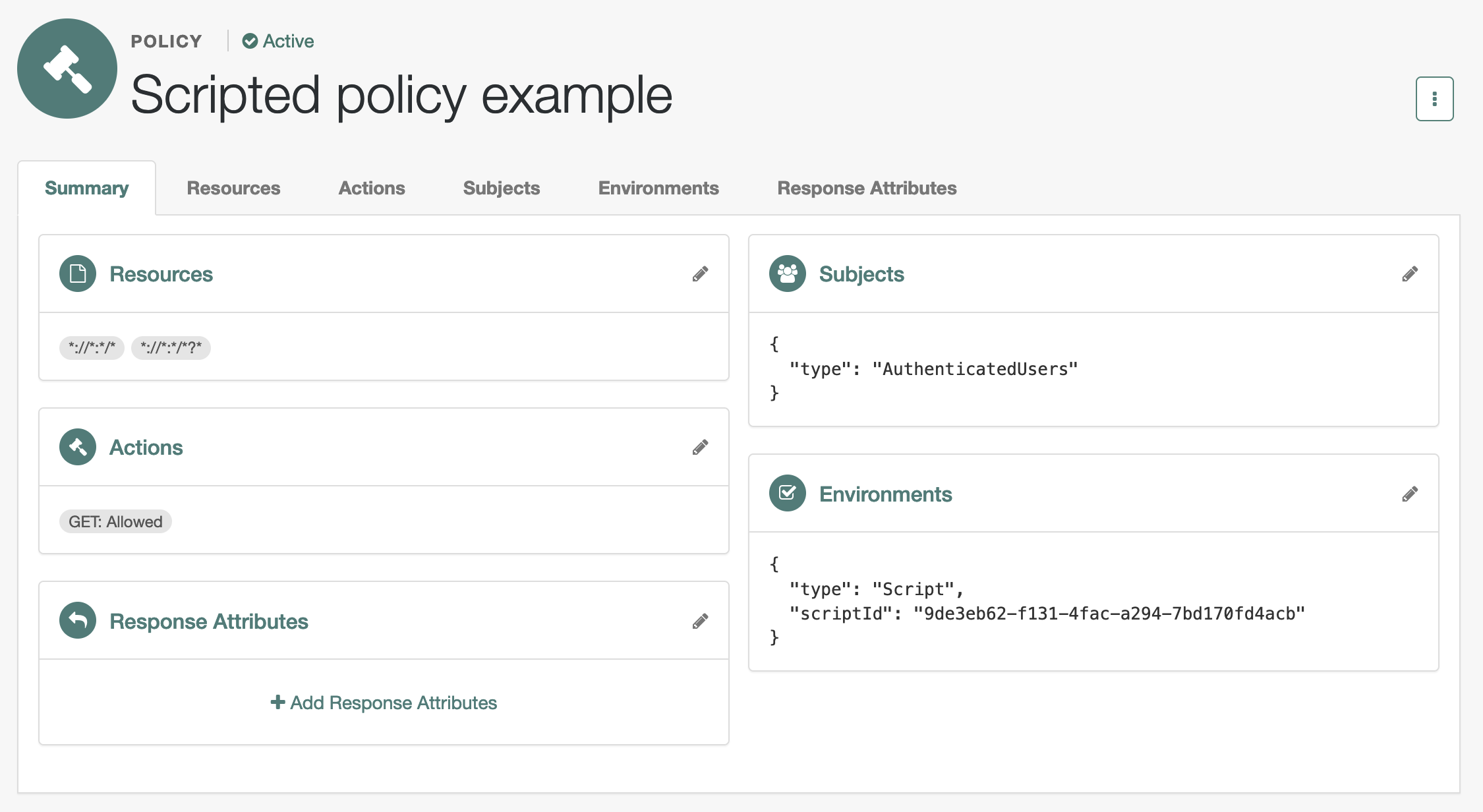
Create a policy in the policy set.
Select Realms > realm name > Authorization > Policy Sets > am-policy-set > + Add a Policy to create a policy with the following settings:
- Name
-
Scripted policy example - Resource Types
-
URL - Resources
-
*://*:*/*,*://*:*/*?*
-
In the new policy, update the settings.
Allow HTTP GET access by all authenticated users when permitted by the script:
- Actions
-
GET: Allow
- Subjects
-
Type:
Authenticated Users - Environments
-
Type:
Script, Script Name:Location Authorization Script
When modifying settings in the policy editor, select the edit icon to begin changing the setting, the check icon to confirm the change, then Save Changes to commit the change.
-
Verify the policy settings.
Try the demonstration
The policies?_action=evaluate endpoint lets a policy administrator make a REST call over HTTP
to get a policy decision from PingAM.
PingAM policy decisions for URL policies show at least the HTTP actions the user can perform.
Find more information in Request policy decisions over REST.
Here, when PingAM grants the user access to complete an HTTP GET request to the resource,
the decision includes "actions":{"GET":true}.
When PingAM denies access, the decision includes "actions":{}.
The REST call to the policies?_action=evaluate endpoint requires:
-
An SSO token ID for the policy administrator making the request.
-
An SSO token ID for the end user attempting to access the resource.
-
A request body that specifies who is attempting to access what in what way under what conditions.
-
Get an SSO token for the policy administrator:
$ curl \ --request POST \ --header 'Content-Type: application/json' \ --header 'X-OpenAM-Username: policy-admin-username' \ --header 'X-OpenAM-Password: policy-admin-password' \ --header 'Accept-API-Version: resource=2.0, protocol=1.0' \ 'https://am.example.com:8443/am/json/realms/root/realms/alpha/authenticate' { "tokenId":"policy-admin-tokenId", "successUrl":"/am/console","realm":"/alpha" } -
Get an SSO token for the end user:
$ curl \ --request POST \ --header 'Content-Type: application/json' \ --header 'X-OpenAM-Username: end-user-username' \ --header 'X-OpenAM-Password: end-user-password' \ --header 'Accept-API-Version: resource=2.0, protocol=1.0' \ 'https://am.example.com:8443/am/json/realms/root/realms/alpha/authenticate' { "tokenId":"end-user-tokenId", "successUrl":"/am/console","realm":"/alpha" } -
Request evaluation for a request by an end user in the United States to access a resource located in the United States.
The script lets users access resources located in their country of residence. PingAM grants access when both the user’s home country and IP address match the resource location.
$ curl \
--header 'iPlanetDirectoryPro: policy-admin-tokenId' \
--request POST \
--header 'Content-Type: application/json' \
--header "Accept-API-Version: resource=2.1" \
--data '{
  "resources": ["https://www.whitehouse.gov:443/about-the-white-house/"],
  "actions": {"GET": true},
  "application": "am-policy-set",
  "subject": {
    "ssoToken": "end-user-tokenId"
  },
  "environment": {
    "IP": ["8.8.8.8"]
  }
}' \
'https://am.example.com:8443/am/json/realms/root/realms/alpha/policies?_action=evaluate'
[{
  "resource": "https://www.whitehouse.gov:443/about-the-white-house/",
  "actions": {
    "GET": true
  },
  "attributes": {
    "countryOfOrigin": ["United States"]
  },
  "advices": {},
  "ttl": <ttl>
}]
The script adds
"attributes":{"countryOfOrigin":["United States"]}to the result when PingAM grants access. -
Request evaluation for a request by an end user in France to access a resource located in the United States.
The user’s IP address (
88.174.153.24) maps to a French location, so no actions are returned:$ curl \ --header 'iPlanetDirectoryPro: policy-admin-tokenId' \ --request POST \ --header 'Content-Type: application/json' \ --header "Accept-API-Version: resource=2.1" \ --data '{ "resources": ["https://www.whitehouse.gov:443/about-the-white-house/"], "actions": {"GET": true}, "application": "am-policy-set", "subject": { "ssoToken": "end-user-tokenId" }, "environment": { "IP": ["88.174.153.24"] } }' \ 'https://am.example.com:8443/am/json/realms/root/realms/alpha/policies?_action=evaluate' [{ "resource": "https://www.whitehouse.gov:443/about-the-white-house/", "actions": {}, "attributes": {}, "advices": {}, "ttl": <ttl> }]Both the
attributesand theactionsfields are empty. To verify the authorization outcome, look for anAuthorization failedentry in the logs.
-
OAuth 2.0 scopes policy script API
To customize OAuth 2.0 scope decisions, configure the oauth2Scopes policy with an environment script condition that references an OAuth 2.0 policy condition script.
The following JavaScript writes the ID of the OAuth 2.0 client to the debug log and then authorizes the request:
logger.message("Client ID: " + environment.get("clientId"));
authorized=true;
OAuth 2.0 policy condition scripts can access the bindings available to the policy condition script API,
except for the environment object. Instead of an IP property, this object returns the ID for the client making the authorization request.
For example, the following shows an environment map with a single entry:
"environment": {
    "clientId": [
        "MyOAuth2Client"
    ]
}