Mitek Connector
The Mitek connector lets you create Mitek identity verification journeys in your PingOne DaVinci flow and deliver them by email or SMS.
The connector redirects users to Mitek for identity verification and receives callbacks with the verification results that you can use in your flow.
Setup
Resources
You can find more information and setup help in the following:
-
PingOne DaVinci documentation:
Requirements
To use the connector, you’ll need:
-
Mitek account with API access
-
Mitek Client ID and Client Secret
-
Your Mitek Host URL and Request API Version
-
Add the PingOne DaVinci Redirect Webhook URI to your Mitek tenant configuration.
Configuring the Mitek connector
Add the connector in PingOne DaVinci as shown in Adding a connector, then configure it as follows.
Connector configuration
| Setting | Description |
|---|---|
Redirect Webhook URI |
The PingOne DaVinci webhook URL for this connector. This value is provided automatically as a read-only field and should be copied into your Mitek configuration as needed. |
Client ID |
Your Mitek Client ID. |
Client Secret |
Your Mitek Client Secret. |
Mitek Host URL |
The host URL of the Mitek API (do not include https://). |
Request API Version |
The Mitek request API version used for requests. |
Using the connector in a flow
Creating a verification journey and handling the completion callback
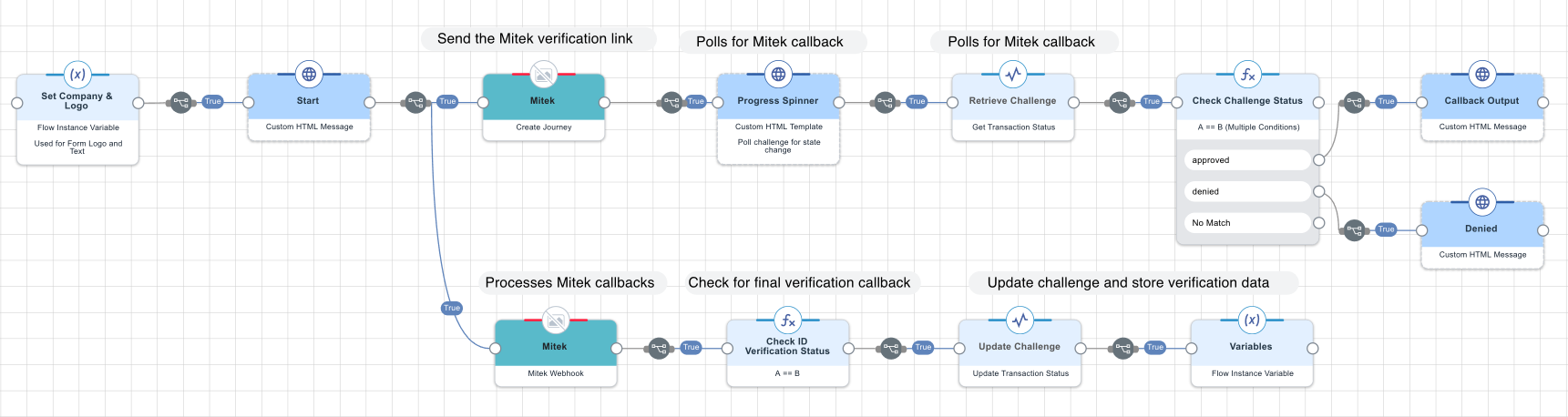
This example flow creates a Mitek verification journey, then waits for the completion callback and stores the verification data for downstream decisions.
At a high level:
-
The Create Journey node sends the verification link to the user using the configured delivery method (email or SMS).
-
The flow displays a “waiting” screen while polling for the verification callback to complete.
-
The Mitek Webhook capability receives webhook callbacks from Mitek. When the callback indicates that verification is complete, the flow evaluates the status and updates the stored challenge state and verification data for later use.
-
The flow branches based on the final outcome (for example, approved or denied) and can display or use the stored verification data in subsequent steps.
Test the flow by clicking Save, Deploy, and Try Flow.
Capabilities
Create Journey
Creates a Mitek verification journey and sends it using email or SMS.
Show details
-
Properties
-
Input Schema
-
Output Schema
- Name textField required
-
Full legal name as on passport/driver’s license. Middle names not required. Must be at least 2 words.
- Send Choice dropDown required
-
Select how to deliver the verification link, either by email or SMS.
-
Email
-
SMS
-
- Email textField
-
Recipient’s email for the invite.
- Phone textField
-
Recipient’s mobile number. Must include the country zone and start with either '+' or '00'.
- Mitek Environment textField
-
Case-sensitive environment (for example, 'live'). Defaults to 'live' if left blank.
- Reference textField
-
Your unique ID to correlate results (alphanumeric and dashes). Auto-generated if left blank.
- Use Defaults toggleSwitch
-
Uses your Mitek environment’s configured defaults when no custom scope is provided.
- Selfie Capture toggleSwitch
-
Includes the selfie step in the verification journey.
- Documents toggleSwitch
-
Include documents in the scope.
- Document Types dropDownMultiSelect
-
Select which document types to include.
-
Driving Licence
-
Passport
-
National ID Card
-
- Attachments toggleSwitch
-
Include attachments in the scope.
- Attachment Keys textField
-
Comma-delimited attachment keys (no spaces), for example, doc1,doc2.
- End Date textField
-
Hard cut-off for the request in YYYY-MM-DD format. If not set, Mitek’s default end date is used.
- Tabs Order textField
-
Comma-delimited list (no spaces). If not set, the tabs order is derived from the configured scopes.
- Note textArea
-
Welcome message shown on the first page of the journey. Overrides the default message configured in the Mitek portal.
- Language dropDown
-
If undefined, Mitek defaults to English.
-
Brazilian Portuguese
-
Bulgarian
-
Danish
-
Dutch
-
English
-
Finnish
-
French
-
German
-
Greek
-
Hungarian
-
Italian
-
Japanese
-
Latvian
-
Lithuanian
-
Norwegian
-
Polish
-
Portuguese
-
Romanian
-
Russian
-
Slovakian
-
Spanish
-
Swedish
-
Turkish
-
US English
-
-
default object
-
mitekName string
Full legal name as on passport/driver’s license. Middle names not required.
-
mitekSendChoice string
Select how to deliver the verification link, either by Email or SMS.
-
mitekEmail string
Recipient’s email for the invite.
-
mitekPhone string
Recipient’s mobile number. Must include the country zone and start with either '+' or '00'.
-
mitekEnvironment string
Case-sensitive environment (for example, 'live'). Defaults to 'live' if left blank.
-
mitekReference string
Your unique ID to correlate results (alphanumeric and dashes). Auto-generated if left blank.
-
mitekUseDefaults boolean
Use default environment settings from the Mitek portal. Overrides any custom scope in this request.
-
mitekScopeSelfie boolean
Enable the selfie capture step for biometric comparison.
-
mitekScopeDocuments boolean
Include ID documents in the scope.
-
mitekDocumentTypes array
Document types to include with the Documents scope. Options: 'passport', 'driving', 'id'. If empty, all document types are included.
-
mitekScopeAttachments boolean
Enable the Attachments step. Includes all attachment labels configured in your Mitek tenant.
-
mitekAttachmentNames array
List of attachment labels to include in the Attachments step. Only used if mitekScopeAttachments is true.
-
mitekEndDate string
Hard cut-off for the request in YYYY-MM-DD format. If not set, Mitek’s default end date is used.
-
mitekTabsOrder string
Comma-delimited list (no spaces) to define page order, for example, 'selfie,documents,attachments'. All items must be included even if hidden by scope.
-
mitekNote string
Welcome message shown on the first page of the journey. Overrides the default message configured in the Mitek portal.
-
mitekLanguage string
If undefined, Mitek defaults to English.
-
-
output object
-
statusCode number
-
body object
-
headers array
-
challenge string
-