WebAuthn Authentication node
Lets users on supported clients use a registered FIDO device during authentication.
To determine whether the user has a registered device, the node reads the username from the shared state.
Implement a Username Collector node (standalone AM) or Platform Username node (Ping Identity Platform deployment)
earlier in the journey.
Compatibility
| Product | Compatible? |
|---|---|
PingOne Advanced Identity Cloud |
|
ForgeRock Access Management (self-managed) |
|
Ping Identity Platform (self-managed) |
Outcomes
Unsupported-
If the user’s client doesn’t support web authentication, evaluation continues along the
Unsupportedoutcome path. For example, clients connected over the HTTP protocol rather than HTTPS do not support WebAuthn; however, HTTPS may not be required when testing locally, onhttp://localhost. For more information, refer to Is origin potentially trustworthy?. No Device Registered-
If the user does not have a registered device, evaluation continues along the
No Device Registeredoutcome path.- Username enumeration risk
-
When WebAuthn is the only authentication method, routing the
No Device Registeredoutcome to a visually distinct path, such as password login or device registration, allows attackers to identify valid usernames.When the node processes the request, it performs a username-to-device lookup before issuing any WebAuthn challenge or triggering any browser interaction. This means that a difference in response reveals whether a passkey exists for the user.
This risk is noted in §14.6.2 of the W3C WebAuthn Level 2 specification.
- Mitigation
-
Design your journey to route
No Device Registeredto the same generic failure handling as theFailureoutcome. This ensures the UI, response, and timing of the journey all remain indistinguishable to an attacker.
Success-
If the user successfully authenticates with a device of the type determined by the User verification requirement property, evaluation continues along the
Successoutcome path. Failure-
If AM encounters an issue when attempting to authenticate using the device, evaluation continues along the
Failureoutcome path. For example, AM could not verify that the response from the authenticator was appropriate for the specific instance of the authentication ceremony. Client Error-
If the user’s client encounters an issue when attempting to authenticate using the device, for example, if the timeout was reached, evaluation continues along the
Client Erroroutcome path. This outcome is used whenever the client throws aDOMException, as required by the Web Authentication: An API for accessing Public Key Credentials Level 1 specification.If a client error occurs, the error type and description are added to a property named
WebAuthenticationDOMExceptionin the shared state. This property can be read by other nodes later, if required. Recovery Code(configurable)-
If Allow recovery code is enabled, AM provides the user the option to enter a recovery code rather than authenticate using a device. Evaluation continues along the
Recovery Codeoutcome path if the users chooses to enter a recovery code. To accept and verify the recovery code, ensure the outcome path leads to a Recovery Code Collector Decision node.
Properties
| Property | Usage |
|---|---|
Relying party identifier |
Specifies the domain used as the
relying party identifier during web authentication.
If not specified, AM uses the domain name of the instance, for example, Specify an alternative domain if your AM instances are behind a load balancer, for example. |
Origin domains |
Specifies a list of fully qualified URLs to accept as the origin of incoming requests. If left empty, AM accepts any incoming domain. |
User verification requirement |
Specifies the required level of user verification. The available options are:
|
Allow recovery codes |
Specify whether to allow the user to enter one of their recovery codes instead of performing an authentication gesture. Enabling this options adds a |
Timeout |
Specify the number of seconds to wait for a response from an authenticator. If the specified time is reached, evaluation continues along the |
Username from device |
Specifies whether AM requests that the device provides the username. When enabled, if the device is unable to store or provide usernames,
the node fails and evaluation continues along the For information on using this property for usernameless authentication with ForgeRock Go, refer to Configure usernameless authentication with ForgeRock Go. |
Return challenge as JavaScript |
Choose how the node should return its challenge for consumption by your front-end user interface:
|
Example
This example shows one possible implementation of the flow for authenticating with WebAuthn devices:
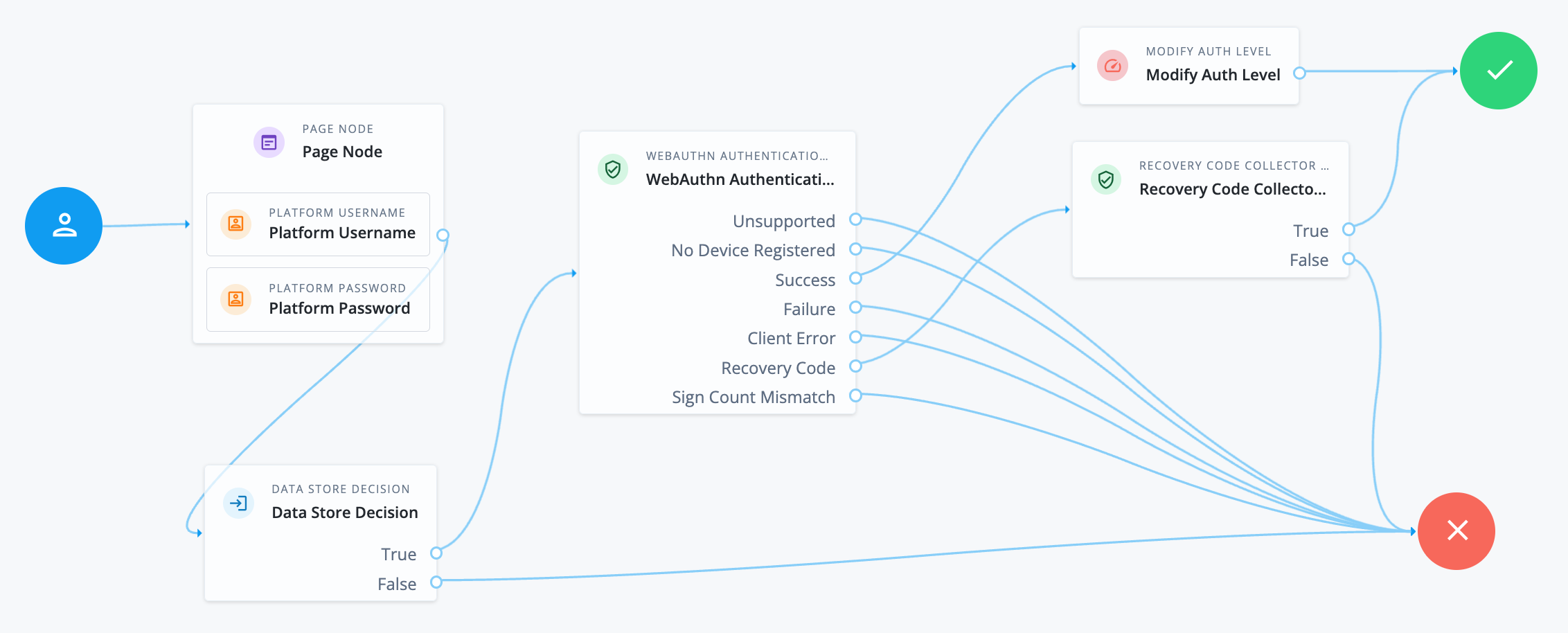
After verifying the users credentials against the configured data store, evaluation continues to the WebAuthn Authentication node.
If the user’s client does not support WebAuthn, authentication fails and the user does not get a session.
A more user-friendly approach would be to set a success URL
to redirect the user to a page explaining the benefits of multi-factor authentication,
and then proceeding to the Success node.
If there are no registered WebAuthn devices present in the user’s profile, the failure URL is set, pointing to a flow that lets the user register a device. This stage could also be an Inner Tree Evaluator node.
If the user’s client does support WebAuthn, and the connection is secured with TLS, the user is prompted to complete an authorization gesture, for example, scanning a fingerprint, or entering a PIN:
The user’s browser may present a consent pop-up to allow access to the authenticators available on the client. When consent has been granted, the browser activates the relevant authenticators, ready for authentication.
|
The relying party details configured in the node are often included in the consent message to help the user verify the entity requesting access. |
The authenticators the client activates for authentication depends on the value of the properties in the node.
For example, if the User verification requirement property is set to REQUIRED,
the client SHOULD only activate authenticators which verify the identity of the user.
For extra protection, AM WILL verify the response from an authenticator
matches the criteria configured for the node, and will reject—with the Failure outcome—an authentication attempt
by an inappropriate authenticator type.
When the user completes an authorization gesture, for example,
by scanning a fingerprint or entering a PIN, evaluation continues along the Success outcome path.
In this example,
their authentication level is increased by ten to signify the stronger authentication that has occurred,
and the user is taken to their profile page.
If the user clicks the Use Recovery Code button, evaluation continues
to the Recovery Code Collector Decision node, ready to accept the recovery code.
If verified, the user is taken to their profile page.
Any problems encountered during authentication lead to the Failure, Client Error,
or Sign Count Mismatch outcomes, resulting in an authentication failure.