Enterprise Connect

What’s new

Enterprise Connect Passwordless Mac Agent 4.3

  • Ping Identity recommends Enterprise Connect Passwordless Mac Agent version 4.3 for use with Authentication Server version 6.4.2 or later.

  • When upgrading from previous versions, make sure you log out of the user account when the installation finishes. You can then sign back on immediately using your preferred authentication method.

Custom UI (Signon and Unlock)

Enterprise Connect Passwordless Mac Agent features a custom sign-on screen that enables users to select their preferred authentication method. The option to sign on with the username and password is also provided.
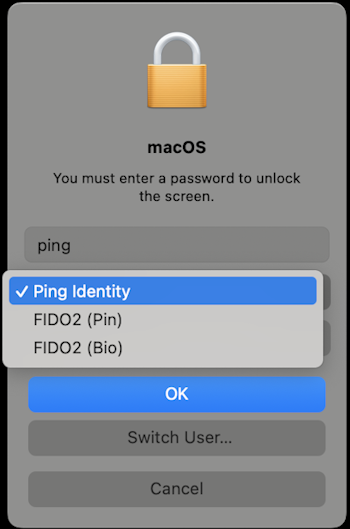
The custom unlock screen that displays the available authentication methods.

An optional custom unlock screen is also available. When enabled, it also lists the authentication options. In the agent configuration file, administrators can use the authenticationMethods element to define which authentication methods to include and configure display options, such as custom messages and prompts for each method. Learn more in the installation guide.
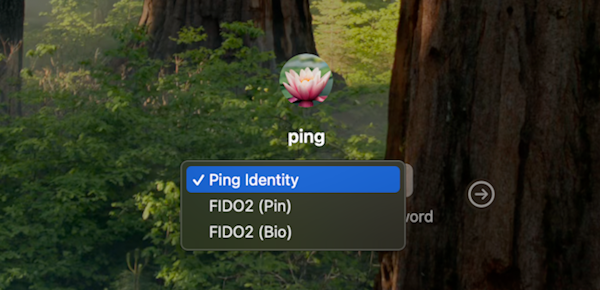
The custom authentication options available on the sign-on screen.

Enterprise Connect Passwordless Mac Agent 2.7.1

  • Enterprise Connect Passwordless Mac Agent version 2.7.1 is for use with Enterprise Connect Passwordless Server version 5.6 (and later) only. Working with older versions of the server isn’t advised.

  • When upgrading from previous versions, make sure you sign off of the user account when the installation finishes. You can then sign on immediately using your preferred authentication method.

Custom UI (Sign-on and Unlock)

Enterprise Connect Passwordless Mac Agent features a custom sign-on screen that enables users to select their preferred authentication method. The option to sign on with username and password is also provided.

The custom unlock screen that displays the available authentication methods.

An optional custom unlock screen is also available. When enabled, it also lists the authentication options. In the agent configuration file, administrators can use the authenticationMethods element to define which authentication methods to include and configure display options, such as custom messages and prompts for each method. Learn more in the installation guide.

The custom authentication options available on the sign-on screen.

Enterprise Connect Passwordless Mac Agent 2.7.1

  • Enterprise Connect Passwordless Mac Agent version 2.7.1 is for use with Enterprise Connect Passwordless Server version 5.6 (and later) only. Working with older versions of the server isn’t advised.

  • When upgrading from previous versions, make sure you sign off of the user account when the installation finishes. You can then sign on immediately using your preferred authentication method.

Custom UI (Sign-on and Unlock)

Enterprise Connect Passwordless Mac Agent features a custom sign-on screen that enables users to select their preferred authentication method. The option to sign on with the username and password is also provided.

The custom unlock screen that displays the available authentication methods.

An optional custom unlock screen is also available. When enabled, it also lists the authentication options. In the agent configuration file, administrators can use the authenticationMethods element to define which authentication methods to include and configure display options, such as custom messages and prompts for each method. Learn more in the installation guide.

The custom authentication options available on the sign-on screen.

Enterprise Connect Passwordless Mac Agent 2.7.1

  • Enterprise Connect Passwordless Mac Agent version 2.7.1 is for use with Enterprise Connect Passwordless Server version 5.6 (and later) only. Working with older versions of the server isn’t advised.

  • When upgrading from previous versions, make sure you sign off of the user account when the installation finishes. You can then sign on immediately using your preferred authentication method.

Enterprise Connect Passwordless Mac Agent 2.6.7

Enterprise Connect Passwordless Mac Agent 2.6.7 is compatible only with Enterprise Connect Passwordless Server 5.4.8 or later.

Authentication widget support

The authentication widget now supports shutdown and logoff password prompts when another user is logged in.

Enhanced uninstallation process

To remove the Mac agent from the machine when uninstalling, the system prompts users to perform a FileVault teardown.